
Lexus ES: Inspection
INSPECTION
PROCEDURE
1. INSPECT SIDE TURN SIGNAL LIGHT ASSEMBLY LH
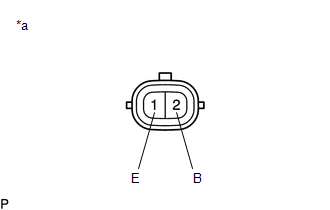
| *a | Component without harness connected (Side Turn Signal Light Assembly LH) |
(a) Apply auxiliary battery voltage to the side turn signal light assembly LH and check that the light illuminates.
OK:
| Measurement Condition | Specified Condition |
|---|---|
| Auxiliary battery positive (+) → Terminal 2 (B) Auxiliary battery negative (-) → Terminal 1 (E) | Side turn signal light illuminates |
If the result is not as specified, replace the side turn signal light assembly LH.
2. INSPECT SIDE TURN SIGNAL LIGHT ASSEMBLY RH
| *a | Component without harness connected (Side Turn Signal Light Assembly RH) |
(a) Apply auxiliary battery voltage to the side turn signal light assembly RH and check that the light illuminates.
OK:
| Measurement Condition | Specified Condition |
|---|---|
| Auxiliary battery positive (+) → Terminal 2 (B) Auxiliary battery negative (-) → Terminal 1 (E) | Side turn signal light illuminates |
If the result is not as specified, replace the side turn signal light assembly RH.
READ NEXT:
 Installation
INSTALLATION CAUTION / NOTICE / HINT HINT:
Use the same procedure for the RH side and LH side.
The following procedure is for the LH side.
PROCEDURE 1. INSTALL SIDE TURN SIGNAL LIGHT ASSEMBLY
Components
COMPONENTS ILLUSTRATION *1 NO. 1 INSTRUMENT PANEL UNDER COVER SUB-ASSEMBLY *2 STOP LIGHT SWITCH ASSEMBLY
SEE MORE:
Dtc Check / Clear
DTC CHECK / CLEAR CHECK DTC (a) Connect the Techstream to the DLC3. (b) Turn the engine switch on (IG). (c) Turn the Techstream on. (d) Enter the following menus: Body Electrical > Front Radar Sensor > Trouble Codes (e) Check for DTCs (Test Failed / Pending / Confirmed). Techstream Display
Calibration
CALIBRATION ADJUST PANORAMIC VIEW MONITOR SYSTEM (a) This panoramic view monitor system can be set from the diagnostic screen of the multi-display assembly. (b) If the following operations are performed, it is necessary to perform adjustments and checks on the diagnostic screen. Part Name Opera
