
Lexus ES: Removal
REMOVAL
CAUTION / NOTICE / HINT
The necessary procedures (adjustment, calibration, initialization, or registration) that must be performed after parts are removed and installed, or replaced during back-up battery removal/installation are shown below.
Necessary Procedure After Parts Removed/Installed/Replaced (for HV Model)| Replaced Part or Performed Procedure | Necessary Procedure | Effect/Inoperative Function when Necessary Procedure not Performed | Link |
|---|---|---|---|
| Back-up battery | Perform the reset back-up battery condition | Safety Connect System | |
| Replaced Part or Performed Procedure | Necessary Procedure | Effect/Inoperative Function when Necessary Procedure not Performed | Link |
|---|---|---|---|
| Back-up battery | Perform the reset back-up battery condition | Safety Connect System | |
PROCEDURE
1. REMOVE DCM (TELEMATICS TRANSCEIVER) WITH BRACKET
Click here .gif)
2. REMOVE BACK-UP BATTERY
(a) Disengage the 3 claws and 2 guides as shown in the illustration to remove the transceiver cover.
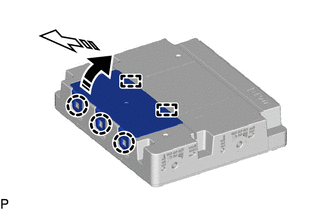
.png) | Remove in this Direction (1) |
.png) | Remove in this Direction (2) |
(b) Disconnect the connector.
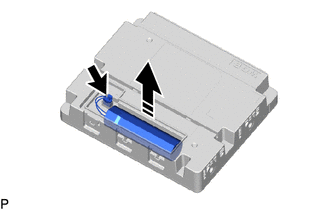
| | Remove in this Direction |
(c) Remove the back-up battery as shown in the illustration.
READ NEXT:
 Components
COMPONENTS ILLUSTRATION *1 CENTER INSTRUMENT CLUSTER FINISH PANEL SUB-ASSEMBLY *2 INSTRUMENT PANEL FINISH PANEL END LH *3 INSTRUMENT PANEL FINISH PANEL END RH *4 REAR UPPER CONSOLE
Installation
INSTALLATION PROCEDURE 1. INSTALL DCM (TELEMATICS TRANSCEIVER) 2. INSTALL NO. 1 TELEPHONE BRACKET (a) Install the No. 1 telephone bracket with the screw. 3. INSTALL TELEPHONE BRACKET (a) Install the t
SEE MORE:
Door Mirror ECU RH Communication Stop Mode
DESCRIPTION Detection Item Symptom Trouble Area Door Mirror ECU RH Communication Stop Mode Any of the following conditions are met:
Communication stop for "Front Door RH/R-Mirror (FR-Door/R-Mirror)" is indicated on the "Communication Bus Check" screen of the Techstream.
Click here
CD Sound Skips
CAUTION / NOTICE / HINT NOTICE:
Depending on the parts that are replaced during vehicle inspection or maintenance, performing initialization, registration or calibration may be needed. Refer to Precaution for Audio and Visual System.
Click here
When replacing the radio receiver assembly, alw
