
Lexus ES: Removal
REMOVAL
CAUTION / NOTICE / HINT
The necessary procedures (adjustment, calibration, initialization, or registration) that must be performed after parts are removed and installed, or replaced during motor cable removal/installation are shown below.
Necessary Procedure After Parts Removed/Installed/Replaced| Replaced Part or Performed Procedure | Necessary Procedure | Effect/Inoperative Function when Necessary Procedure not Performed | Link |
|---|---|---|---|
| Auxiliary battery terminal is disconnected/reconnected | Perform steering sensor zero point calibration | Lane Control System (for HV Model) | |
| Pre-collision System (for HV Model) | |||
| Parking Support Brake System (for HV Model)* | |||
| Lighting System (for HV Model) | |||
| Memorize steering angle neutral point | Parking Assist Monitor System (for HV Model) | | |
| Panoramic View Monitor System (for HV Model) | | ||
| Initialize power trunk lid system | Power Trunk Lid System (for HV Model) | | |
| Replacement of ECM | Perform Vehicle Identification Number (VIN) registration | MIL illuminates | |
| Replacement of inverter with converter assembly | Resolver learning |
| |
-
*: When performing learning using the Techstream.
Click here
.gif)
CAUTION:
-
Orange wire harnesses and connectors indicate high-voltage circuits. To prevent electric shock, always follow the procedure described in the repair manual.
.png)
Click here
-
To prevent electric shock, wear insulated gloves when working on wire harnesses and components of the high voltage system.
.png)
NOTICE:
- After the engine switch is turned off, the radio receiver assembly records various types of memory and settings. As a result, after turning the engine switch off, make sure to wait at least 85 seconds before disconnecting the cable from the negative (-) battery terminal. (for Audio and Visual System)
- After the engine switch is turned off, the radio receiver assembly records various types of memory and settings. As a result, after turning the engine switch off, make sure to wait at least 85 seconds before disconnecting the cable from the negative (-) battery terminal. (for Navigation System)
PROCEDURE
1. REMOVE INVERTER WITH CONVERTER ASSEMBLY
Click here
2. REMOVE MOTOR CABLE
CAUTION:
Be sure to wear insulated gloves.
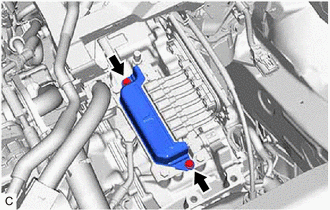
| (a) Remove the 2 bolts and connector cover from the hybrid vehicle transaxle assembly. |
|
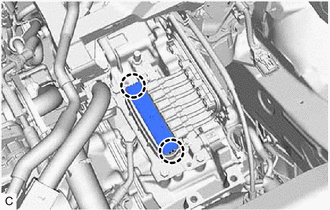
| (b) Disengage the 2 claws to remove the terminal cap from the hybrid vehicle transaxle assembly. |
|
| (c) Using an insulated tool, remove the 6 bolts and motor cable from the hybrid vehicle transaxle assembly. NOTICE:
|
|
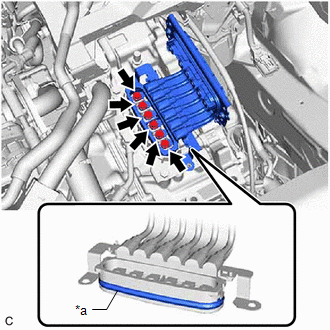
READ NEXT:
 Components
COMPONENTS ILLUSTRATION *1 FRONT WHEEL OPENING EXTENSION PAD RH *2 FRONT WHEEL OPENING EXTENSION PAD LH *3 NO. 1 ENGINE UNDER COVER *4 NO. 2 ENGINE UNDER COVER ASSEMBLY *5 FR
Installation
INSTALLATION PROCEDURE 1. INSTALL NO. 1 MOTOR COOLING HOSE HINT: Perform this procedure only when replacement of the motor cooling cooler is necessary. (a) Coat the pipe of the motor cooling cooler wi
SEE MORE:
Left Electric Parking Brake Actuator Control Circuit Open (C060B13)
DESCRIPTION DTC No. Detection Item DTC Detection Condition Trouble Area Memory Note C060B13 Left Electric Parking Brake Actuator Control Circuit Open
Diagnosis Condition:
Electric parking brake not operating
Malfunction Status:
The ECU power supply is normal but there is a
System Description
SYSTEM DESCRIPTION SLIDING ROOF SYSTEM DESCRIPTION (a) The sliding roof system controls the sliding roof operation using the sliding roof ECU (sliding roof drive gear sub-assembly). Operating the sliding roof switch (map light sub-assembly) results in electrical power being transmitted to the slidin
