
Lexus ES: Inspection
INSPECTION
PROCEDURE
1. INSPECT DRIVE MODE SELECT SWITCH (COMBINATION SWITCH ASSEMBLY)
(a) Inspect the "Normal" mode switch:
| (1) Measure the resistance according to the value(s) in the table below. Standard Resistance:
If the result is not as specified, replace the drive mode select switch (combination switch assembly). |
|
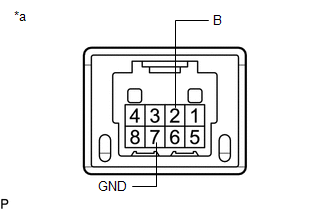
(b) Inspect the "Sport" mode switch:
| (1) Measure the resistance according to the value(s) in the table below. Standard Resistance:
If the result is not as specified, replace the drive mode select switch (combination switch assembly). |
|
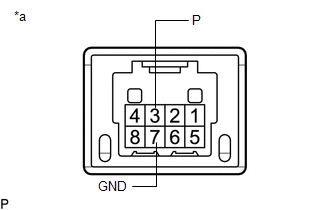
(c) Inspect the "Eco" mode switch:
| (1) Measure the resistance according to the value(s) in the table below. Standard Resistance:
If the result is not as specified, replace the drive mode select switch (combination switch assembly). |
|
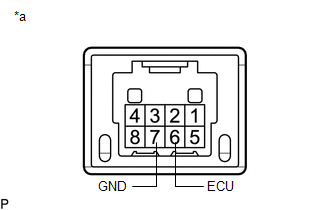
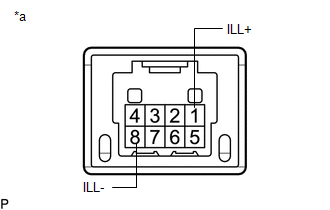
(d) Inspect the illumination:
| (1) Apply battery voltage to the drive mode select switch (combination switch assembly) and check that the switch illuminates. OK:
If the result is not as specified, replace the drive mode select switch (combination switch assembly). |
|
READ NEXT:
 Installation
INSTALLATION PROCEDURE 1. INSTALL DRIVE MODE SELECT SWITCH (COMBINATION SWITCH ASSEMBLY) (a) Install the drive mode select switch (combination switch assembly) to the instrument cluster finish panel a
Removal
REMOVAL PROCEDURE 1. REMOVE INSTRUMENT CLUSTER FINISH PANEL ASSEMBLY Click here 2. REMOVE DRIVE MODE SELECT SWITCH (COMBINATION SWITCH ASSEMBLY) (a) Disconnect the drive mode select switch (comb
SEE MORE:
High Temperature Adjustment
HIGH TEMPERATURE ADJUSTMENT CAUTION / NOTICE / HINT The necessary procedures (adjustment, calibration, initialization or registration) that must be performed after parts are removed and installed, or replaced during automatic transaxle fluid adjustment are shown below. Necessary Procedures After Par
Vehicle Speed Sensor (B2415)
DESCRIPTION The headlight ECU sub-assembly LH receives speed signals from the skid control ECU (brake booster with master cylinder assembly) via CAN communication and performs light control. for LED Type Turn Signal Light DTC No. Detection Item DTC Detection Condition Trouble Area DTC Out
