
Lexus ES: System Diagram
SYSTEM DIAGRAM
w/ Navigation System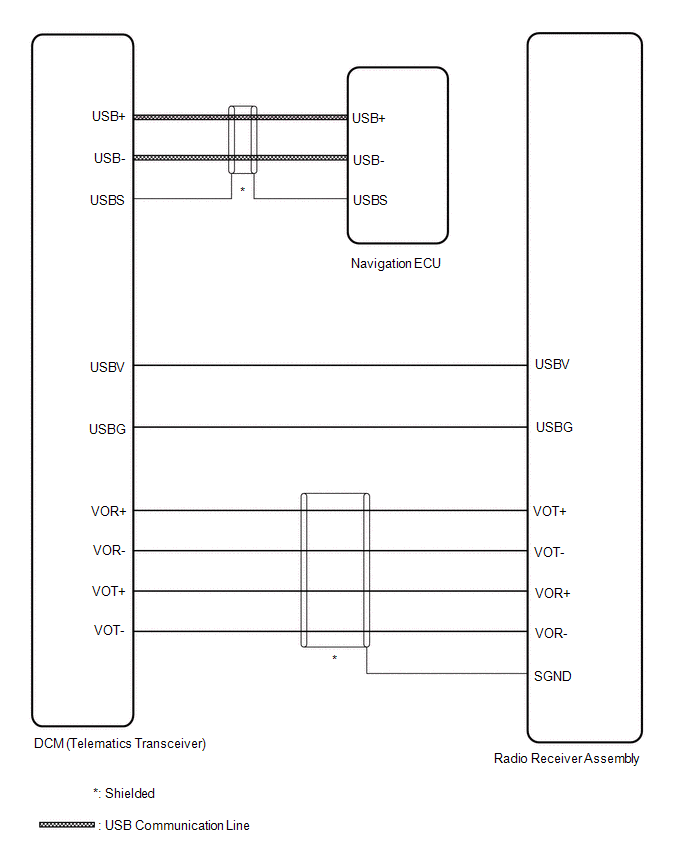
READ NEXT:
 Terminals Of Ecu
TERMINALS OF ECU DCM (TELEMATICS TRANSCEIVER) *a to Telephone Antenna (Sub) *b to GPS Antenna *c to Telephone Antenna (Main) - - Terminal No. (Symbol) Wiring Color Termin
Confirm Cellular Phone Functionality
PROCEDURE 1. CHECK CUSTOMER'S CELLULAR PHONE COMPATIBILITY (a) Check if the cellular phone is compatible (Refer to http://www.lexus.com/MobileLink/). Result Proceed to Cellular phone
SEE MORE:
Knock Sensor
ComponentsCOMPONENTS ILLUSTRATION *1 KNOCK CONTROL SENSOR - - N*m (kgf*cm, ft.*lbf): Specified torque - - InspectionINSPECTION PROCEDURE 1. INSPECT KNOCK CONTROL SENSOR (a) Measure the resistance according to the value(s) in the table below. Standard Resistance: Test
Terminals Of Ecu
TERMINALS OF ECU CHECK 4WD ECU ASSEMBLY (a) Measure the voltage and resistance of the connector. Terminal No. (Symbol) Wiring Color Terminal Description Condition Specified Condition G131-6 (CANH) - G131-5 (CANL) G - W HIGH-level CAN bus wire - LOW-level CAN bus wire Cable disc
© 2016-2026 Copyright www.lexguide.net
