
Lexus ES: Rear Wheel House Plate
Components
COMPONENTS
ILLUSTRATION
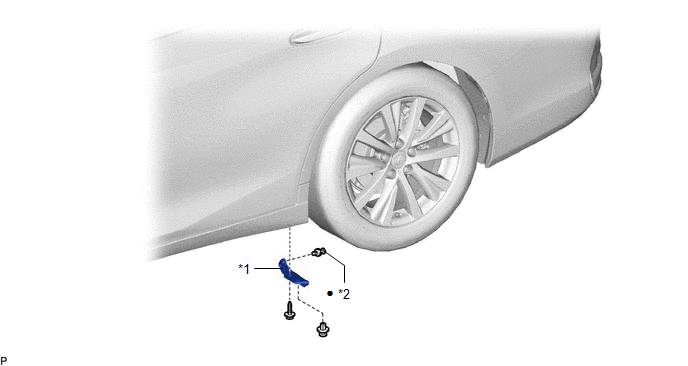
| *1 | NO. 2 ROCKER PANEL MOULDING PROTECTOR | *2 | CLIP |
| ● | Non-reusable part | - | - |
Removal
REMOVAL
CAUTION / NOTICE / HINT
HINT:
- Use the same procedure for the RH side and LH side.
- The following procedure is for the LH side.
PROCEDURE
1. REMOVE NO. 2 ROCKER PANEL MOULDING PROTECTOR
| (a) Remove the 2 clips. |
|
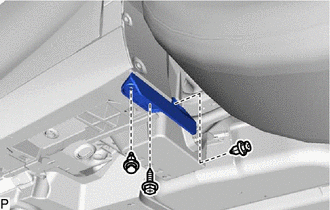
(b) Remove the screw and No. 2 rocker panel moulding protector.
Installation
INSTALLATION
CAUTION / NOTICE / HINT
HINT:
- Use the same procedure for the RH side and LH side.
- The following procedure is for the LH side.
PROCEDURE
1. INSTALL NO. 2 ROCKER PANEL MOULDING PROTECTOR
| (a) Temporarily install the No. 2 rocker panel moulding protector with the screw. |
|
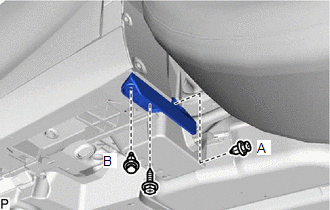
(b) Install a new clip (A).
(c) Install the No. 2 rocker panel moulding protector with the clip (B).
READ NEXT:
 Components
COMPONENTS ILLUSTRATION *1 BODY ROCKER PANEL MOULDING ASSEMBLY *2 NO. 2 ROCKER PANEL MOULDING PROTECTOR *3 ROCKER PANEL MOULDING COVER *4 CLIP ● Non-reusable part - -
Removal
REMOVAL CAUTION / NOTICE / HINT HINT:
Use the same procedure for the RH side and LH side.
The following procedure is for the LH side.
PROCEDURE 1. REMOVE NO. 2 ROCKER PANEL MOULDING PROTECTOR
SEE MORE:
Vehicle Control History
VEHICLE CONTROL HISTORY NOTICE: When checking the Vehicle Control History, make sure to record the output codes. Then, clear the Vehicle Control History (RoB) and check it again. CHECK VEHICLE CONTROL HISTORY (FRONT RADAR SENSOR SYSTEM) (a) Connect the Techstream to the DLC3. (b) Turn the power swit
Installation
INSTALLATION CAUTION / NOTICE / HINT HINT:
Use the same procedure for the RH side and LH side.
The following procedure is for the LH side.
PROCEDURE 1. INSTALL HEADLIGHT GASKET (a) Install a new headlight gasket. 2. INSTALL HEADLIGHT ECU SUB-ASSEMBLY NOTICE: If the headlight ECU sub-assembly
© 2016-2026 Copyright www.lexguide.net
