
Lexus ES: Components
COMPONENTS
ILLUSTRATION
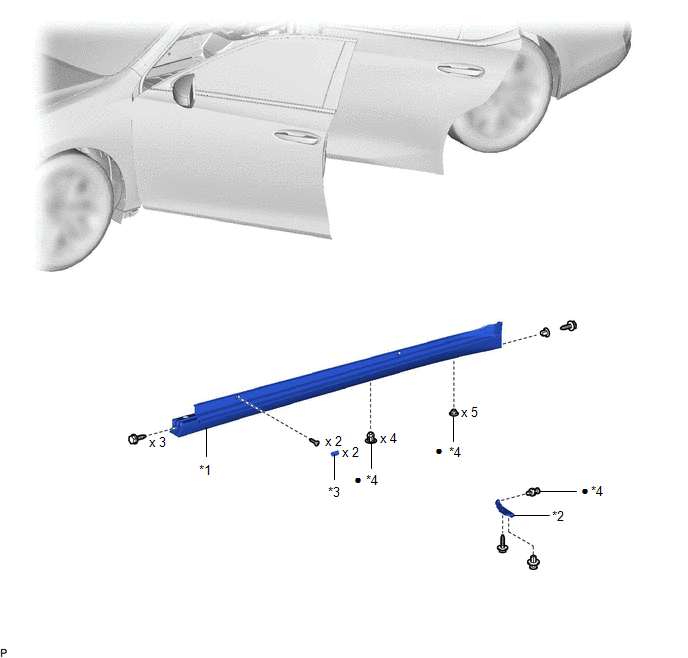
| *1 | BODY ROCKER PANEL MOULDING ASSEMBLY | *2 | NO. 2 ROCKER PANEL MOULDING PROTECTOR |
| *3 | ROCKER PANEL MOULDING COVER | *4 | CLIP |
| ● | Non-reusable part | - | - |
ILLUSTRATION
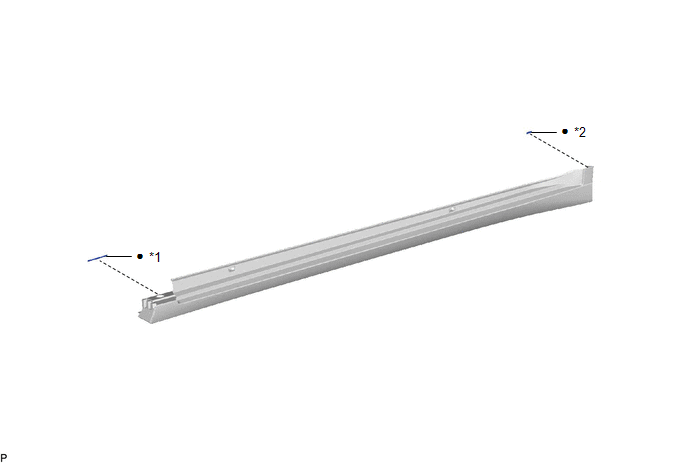
| *1 | NO. 4 ROCKER PANEL MOULDING PROTECTOR | *2 | NO. 5 ROCKER PANEL MOULDING PROTECTOR |
| ● | Non-reusable part | - | - |
READ NEXT:
 Removal
REMOVAL CAUTION / NOTICE / HINT HINT:
Use the same procedure for the RH side and LH side.
The following procedure is for the LH side.
PROCEDURE 1. REMOVE NO. 2 ROCKER PANEL MOULDING PROTECTOR
Disassembly
DISASSEMBLY PROCEDURE 1. REMOVE NO. 4 ROCKER PANEL MOULDING PROTECTOR (a) Remove the No. 4 rocker panel moulding protector. 2. REMOVE NO. 5 ROCKER PANEL MOULDING PROTECTOR (a) Remove
Reassembly
REASSEMBLY PROCEDURE 1. INSTALL NO. 5 ROCKER PANEL MOULDING PROTECTOR HINT: When installing the No. 5 rocker panel moulding protector, heat the body rocker panel moulding assembly using a heat light.
SEE MORE:
Open in Bus 1 Main Bus Line
DESCRIPTION There may be an open circuit in one of the CAN main bus lines when the resistance between terminals 23 (CA1H) and 8 (CA1L) of the central gateway ECU (network gateway ECU) is 70 Ω or higher. Symptom Trouble Area Resistance between terminals 23 (CA1H) and 8 (CA1L) of the central
Dtc Check / Clear
DTC CHECK / CLEAR CHECK DTC (a) Connect the Techstream to the DLC3. (b) Turn the engine switch on (IG). (c) Turn the Techstream on. (d) Enter the following menus: Body Electrical > Front Radar Sensor > Trouble Codes (e) Check for DTCs (Test Failed / Pending / Confirmed). Techstream Display
© 2016-2026 Copyright www.lexguide.net
