
Lexus ES: Power Window Master Switch
Components
COMPONENTS
ILLUSTRATION
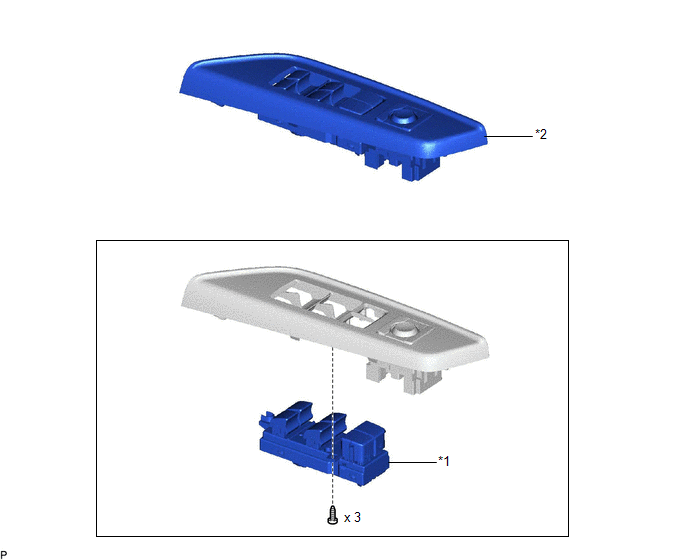
| *1 | MULTIPLEX NETWORK MASTER SWITCH ASSEMBLY | *2 | MULTIPLEX NETWORK MASTER SWITCH ASSEMBLY WITH FRONT DOOR UPPER ARMREST BASE PANEL |
Removal
REMOVAL
PROCEDURE
1. REMOVE MULTIPLEX NETWORK MASTER SWITCH ASSEMBLY WITH FRONT DOOR UPPER ARMREST BASE PANEL
Click here .gif)
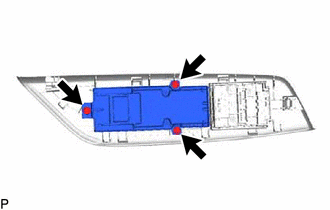
2. REMOVE MULTIPLEX NETWORK MASTER SWITCH ASSEMBLY
| (a) Remove the 3 screws and multiplex network master switch assembly. |
|
Inspection
INSPECTION
PROCEDURE
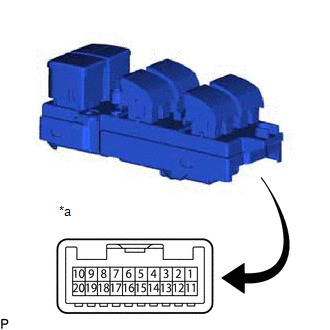
1. INSPECT MULTIPLEX NETWORK MASTER SWITCH ASSEMBLY
| (a) Check that the LEDs illuminate. (1) Apply auxiliary battery voltage to the multiplex network master switch assembly and check that the LEDs illuminate. OK:
If the result is not as specified, replace the multiplex network master switch assembly. |
|
READ NEXT:
 Components
COMPONENTS ILLUSTRATION *A for Driver Side *B for Front Passenger Side *1 COURTESY LIGHT ASSEMBLY *2 FRONT DOOR TRIM BOARD SUB-ASSEMBLY *3 MULTIPLEX NETWORK MASTER SWITCH ASS
Removal
REMOVAL CAUTION / NOTICE / HINT The necessary procedures (adjustment, calibration, initialization, or registration) that must be performed after parts are removed and installed, or replaced during pow
SEE MORE:
Reassembly
REASSEMBLY CAUTION / NOTICE / HINT NOTICE: This procedure includes the installation of small-head bolts. Refer to Small-Head Bolts of Basic Repair Hint to identify the small-head bolts. Click here PROCEDURE 1. INSTALL STRAIGHT PIN NOTICE: It is not necessary to remove the straight pins unless they
Camshaft Position Sensor "A" Bank 1 or Single Sensor No Signal (P034031,P034531)
DESCRIPTION Refer to DTC P034011. Click here DTC No. Detection Item DTC Detection Condition Trouble Area MIL Memory Note P034031 Camshaft Position Sensor "A" Bank 1 or Single Sensor No Signal A missing VVT sensor (for intake camshaft of bank 1) signal despite the crankshaft
