
Lexus ES: Installation
INSTALLATION
PROCEDURE
1. INSTALL FUEL TANK PRESSURE SENSOR (VAPOR PRESSURE SENSOR)
| (a) Push the fuel tank pressure sensor (vapor pressure sensor) onto the fuel tank assembly, then install the tube joint clip. NOTICE:
|
|
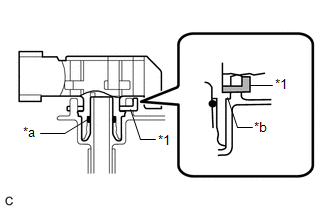
2. INSTALL REAR FLOOR SERVICE HOLE COVER
Click here .gif)
3. INSTALL REAR SEAT ASSEMBLY
Click here
READ NEXT:
 Components
COMPONENTS ILLUSTRATION *1 FUEL VAPOR CONTAINMENT VALVE (FUEL TANK SOLENOID MAIN VALVE ASSEMBLY) *2 FUEL TANK VENT HOSE SUB-ASSEMBLY *3 FUEL TANK VENT HOSE - - N*m (kgf*cm,
Removal
REMOVAL PROCEDURE 1. REMOVE FUEL VAPOR CONTAINMENT VALVE (FUEL TANK SOLENOID MAIN VALVE ASSEMBLY) (a) Disconnect the fuel vapor containment valve (fuel tank solenoid main valve assembly) connector.
SEE MORE:
LTA (Lane Tracing Assist)
When driving on highways and
freeways with white (yellow) lane
lines, this function alerts the driver
when the vehicle might depart from
its lane or course* and provides
assistance by operating the steering
wheel to keep the vehicle in its
lane or course*. Furthermore, the
system provides st
Inspection
INSPECTION PROCEDURE 1. INSPECT OUTER REAR VIEW MIRROR ASSEMBLY RH (a) Check the operation of the mirror surface. NOTICE: If the mirror surface is fully turned to the right, left, upward or downward position, the motor slips and produces a clicking noise. This is not a malfunction. (1) Disconnect
© 2016-2026 Copyright www.lexguide.net
