
Lexus ES: There is No Sound Made
DESCRIPTION
Based on signals received from each ECU, the vehicle approaching speaker controller outputs warning sounds through the vehicle approaching speaker assembly.
WIRING DIAGRAM
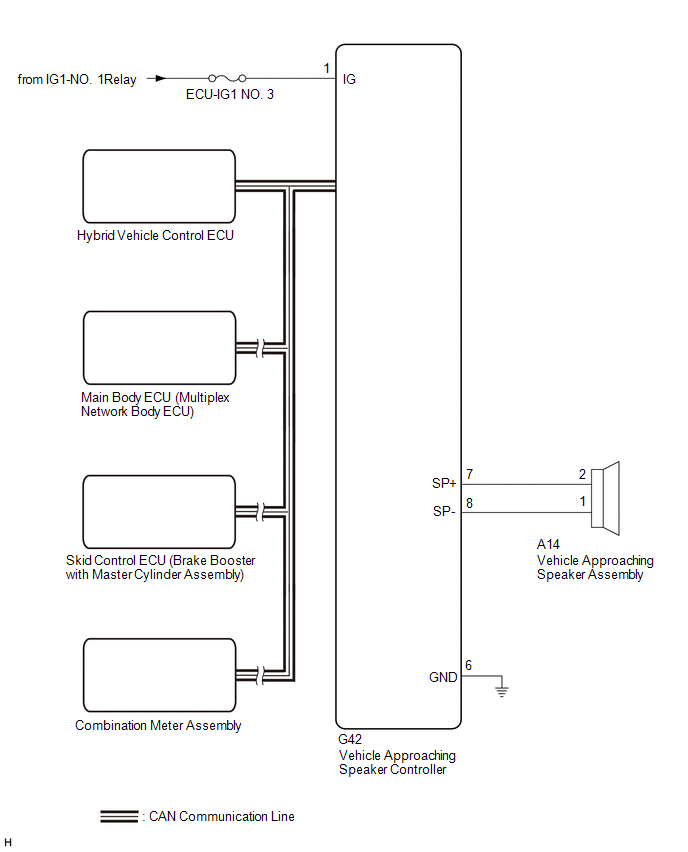
CAUTION / NOTICE / HINT
NOTICE:
- Inspect the fuses for circuits related to this system before performing the following procedure.
-
The vehicle proximity notification system uses the CAN communication system. Inspect the communication functions by following How to Proceed with Troubleshooting. Troubleshoot the automatic high beam system after confirming that the communication systems are functioning properly.
Click here
.gif)
PROCEDURE
| 1. | CHECK FOR DTC |
(a) Connect the Techstream to the DLC3.
(b) Turn the power switch on (IG).
(c) Turn the Techstream on.
(d) Enter the following menus: Body Electrical / Vehicle Proximity Notification System / Trouble Codes.
Body Electrical > Vehicle Proximity Notification System > Trouble Codes(e) Check for DTCs.
| Result | Proceed to |
|---|---|
| DTC B1350 is not output | A |
| DTC B1350 is output | B |
| B | .gif) | GO TO DTC CHART B1350 |
|
.gif)
| 2. | PERFORM ACTIVE TEST USING TECHSTREAM |
(a) Connect the Techstream to the DLC3.
(b) Turn the power switch on (IG).
(c) Turn the Techstream on.
(d) Enter the following menus: Body Electrical / Vehicle Proximity Notification System / Active Test.
(e) Perform the Active Test according to the display on the Techstream.
Body Electrical > Vehicle Proximity Notification System > Active Test| Tester Display | Measurement Item | Control Range | Diagnostic Note |
|---|---|---|---|
| Proximity Sound (Vehicle Stationary) | 0 km/h (0 mph) vehicle proximity warning sound | OFF or ON | - |
| Tester Display |
|---|
| Proximity Sound (Vehicle Stationary) |
| Result | Proceed to |
|---|---|
| The warning sound is produced | A |
| The warning sound is not produced | B |
| A | | REPLACE VEHICLE APPROACHING SPEAKER CONTROLLER |
|
| 3. | CHECK HARNESS AND CONNECTOR (VEHICLE APPROACHING SPEAKER CONTROLLER - POWER SOURCE AND BODY GROUND) |
(a) Disconnect the G42 vehicle approaching speaker controller connector.
(b) Measure the voltage according to the value(s) in the table below.
Standard Voltage:
| Tester Connection | Condition | Specified Condition |
|---|---|---|
| G42-1 (IG) - Body ground | Power switch on (IG) | 11 to 14 V |
(c) Measure the resistance according to the value(s) in the table below.
Standard Resistance:
| Tester Connection | Condition | Specified Condition |
|---|---|---|
| G42-6 (GND) - Body ground | Always | Below 1 Ω |
| OK | | REPLACE VEHICLE APPROACHING SPEAKER CONTROLLER |
| NG | | REPAIR OR REPLACE HARNESS OR CONNECTOR |
READ NEXT:
 Components
COMPONENTS ILLUSTRATION *A w/o Rear Sunshade *B w/ Rear Sunshade *1 CENTER STOP LIGHT SET *2 NO. 2 PACKAGE TRAY TRIM PANEL ASSEMBLY *3 PACKAGE TRAY TRIM PANEL ASSEMBLY *4
SEE MORE:
Installation
INSTALLATION CAUTION / NOTICE / HINT HINT:
Use the same procedure for the RH side and LH side.
The following procedure is for the LH side.
PROCEDURE 1. INSTALL FRONT DOOR OUTSIDE MOULDING SUB-ASSEMBLY (a) Engage the guide and claw to temporarily install the front door outside moulding sub-as
Hybrid/EV Powertrain Control Module Monitoring Processor Unexpected Operation (P060A94)
DTC SUMMARY MALFUNCTION DESCRIPTION The main CPU and sub CPU of the hybrid vehicle control ECU monitor their internal operation and each other for malfunctions. The cause of this malfunction may be the following: Hybrid vehicle control ECU internal malfunction
Hybrid vehicle control ECU malfuncti
