
Lexus ES: Removal
REMOVAL
CAUTION / NOTICE / HINT
The necessary procedures (adjustment, calibration, initialization, or registration) that must be performed after parts are removed and installed, or replaced during radio setting condenser removal/installation are shown below.
Necessary Procedure After Parts Removed/Installed/Replaced (for HV Model)| Replaced Part or Performed Procedure | Necessary Procedures | Effect/Inoperative Function When Necessary Procedures are not Performed | Link |
|---|---|---|---|
|
*: When performing learning using the Techstream.
Click here | |||
| Disconnect cable from negative auxiliary battery terminal | Perform steering sensor zero point calibration | Lane Control System | |
| Pre-collision System | |||
| Parking Support Brake System* | |||
| Lighting System | |||
| Memorize steering angle neutral point | Parking Assist Monitor System | | |
| Panoramic View Monitor System | | ||
| Initialize power trunk lid system | Power Trunk Lid System | | |
CAUTION:
Some of these service operations affect the SRS airbag system. Read the precautionary notices concerning the SRS airbag system before servicing.
.png)
Click here .gif)
NOTICE:
- After the power switch is turned off, the radio receiver assembly records various types of memory and settings. As a result, after turning the power switch off, make sure to wait at least 85 seconds before disconnecting the cable from the negative (-) auxiliary battery terminal. (for Audio and Visual System)
- After the power switch is turned off, the radio receiver assembly records various types of memory and settings. As a result, after turning the power switch off, make sure to wait at least 85 seconds before disconnecting the cable from the negative (-) auxiliary battery terminal. (for Navigation System)
| Replaced Part or Performed Procedure | Necessary Procedures | Effect/Inoperative Function When Necessary Procedures are not Performed | Link |
|---|---|---|---|
|
*: When performing learning using the Techstream.
Click here | |||
| Disconnect cable from negative battery terminal | Perform steering sensor zero point calibration | Lane Control System | |
| Pre-collision System | |||
| Parking Support Brake System* | |||
| Lighting System | |||
| Memorize steering angle neutral point | Parking Assist Monitor System | | |
| Panoramic View Monitor System | | ||
| Initialize power trunk lid system | Power Trunk Lid System | | |
CAUTION:
Some of these service operations affect the SRS airbag system. Read the precautionary notices concerning the SRS airbag system before servicing.
Click here
NOTICE:
- After the engine switch is turned off, the radio receiver assembly records various types of memory and settings. As a result, after turning the engine switch off, make sure to wait at least 85 seconds before disconnecting the cable from the negative (-) battery terminal. (for Audio and Visual System)
- After the engine switch is turned off, the radio receiver assembly records various types of memory and settings. As a result, after turning the engine switch off, make sure to wait at least 85 seconds before disconnecting the cable from the negative (-) battery terminal. (for Navigation System)
PROCEDURE
1. REMOVE REAR SEAT ASSEMBLY
Click here
2. REMOVE REAR DOOR SCUFF PLATE LH
for HV Model: Click here
for Gasoline Model: Click here
3. REMOVE REAR SEAT SIDE GARNISH LH
Click here
4. REMOVE ROOF SIDE INNER GARNISH ASSEMBLY LH
Click here
5. REMOVE RADIO SETTING CONDENSER
NOTICE:
When the terminal cover is removed, the radio setting condenser must be replaced because the terminal cover and condenser are supplied as a set.
| (a) Remove the bolt. |
|
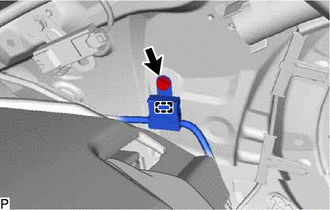
(b) Disengage the clamp and disconnect the radio setting condenser with wire harness from the vehicle body.
(c) Using a screwdriver, disengage the 3 claws and remove the terminal cover with wire harness from the condenser as shown in the illustration.
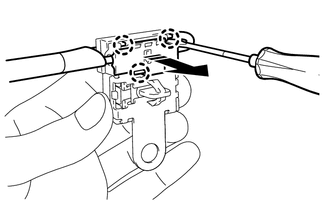
.png) | Remove in this Direction |
| (d) Using a screwdriver, bend back and break off the claw as shown in the illustration. |
|
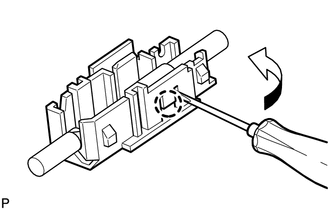
(e) Remove the terminal cover from the wire harness.
NOTICE:
- Make sure to hold the crimped side of the terminal when disconnecting the wire harness from the terminal cover.
- Make sure not to bend the exposed wire when disconnecting the wire harness from the terminal cover.
- Check for deformation of the terminal after the wire harness has been removed from the terminal cover.
READ NEXT:
 Components
COMPONENTS ILLUSTRATION *A w/o Manual (SOS) Switch *B w/ Manual (SOS) Switch *1 ANTENNA CORD SUB-ASSEMBLY *2 NO. 2 SIDE DEFROSTER NOZZLE DUCT *3 NO. 3 HEATER TO REGISTER DUCT
Installation
INSTALLATION PROCEDURE 1. INSTALL NO. 3 ANTENNA CORD SUB-ASSEMBLY (w/ Manual (SOS) Switch) (a) Engage the 5 clamps to install the No. 3 antenna cord sub-assembly. (b) Connect the connector. 2. INSTALL
SEE MORE:
Components
COMPONENTS ILLUSTRATION *1 NO. 1 HV BATTERY SHIELD PANEL *2 UPPER HV BATTERY COVER SUB-ASSEMBLY *3 HYBRID BATTERY TERMINAL BLOCK - - N*m (kgf*cm, ft.*lbf): Specified torque - -
Components
COMPONENTS ILLUSTRATION *1 ENGINE WATER PUMP ASSEMBLY *2 NO. 2 IDLER PULLEY SUB-ASSEMBLY *3 WATER PUMP PULLEY *4 WATER PUMP GASKET *5 V-RIBBED BELT - - N*m (kgf*cm, ft.*lbf): Specified torque ● Non-reusable part Do not apply lubricants to the threade
