
Lexus ES: Removal
REMOVAL
CAUTION / NOTICE / HINT
The necessary procedures (adjustment, calibration, initialization, or registration) that must be performed after parts are removed and installed, or replaced during rear trailing arm assembly removal/installation are shown below.
Necessary Procedures After Parts Removed/Installed/Replaced (for HV Model:)| Replaced Part or Performed Procedure | Necessary Procedure | Effect/Inoperative Function when Necessary Procedure not Performed | Link |
|---|---|---|---|
| *1: for LED type turn signal light | |||
| Suspension, tires, etc. (The vehicle height changes because of suspension or tire replacement.) |
|
| |
| Rear television camera assembly optical axis adjustment (Back camera position setting) | Parking Assist Monitor System | | |
| Panoramic View Monitor System | | |
| Perform headlight ECU sub-assembly LH initialization*1 | Lighting System | | |
| Rear wheel alignment adjustment |
|
| |
| Replaced Part or Performed Procedure | Necessary Procedure | Effect/Inoperative Function when Necessary Procedure not Performed | Link |
|---|---|---|---|
| *1: for LED type turn signal light | |||
| Suspension, tires, etc. (The vehicle height changes because of suspension or tire replacement.) |
|
| |
| Rear television camera assembly optical axis adjustment (Back camera position setting) | Parking Assist Monitor System | | |
| Panoramic View Monitor System | | |
| Perform headlight ECU sub-assembly LH initialization*1 | Lighting System | | |
| Rear wheel alignment adjustment |
|
| |
CAUTION / NOTICE / HINT
HINT:
- Use the same procedure for the RH side and LH side.
- The following procedure is for the LH side.
PROCEDURE
1. REMOVE REAR WHEEL
Click here .gif)
2. REMOVE NO. 2 FLOOR UNDER COVER (for Gasoline Model)
(a) for LH Side:
Click here
3. REMOVE NO. 1 FLOOR UNDER COVER (for Gasoline Model)
(a) for RH Side:
Click here
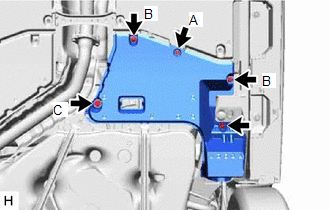
4. REMOVE NO. 2 FLOOR UNDER COVER (for HV Model)
| (a) for LH Side: (1) Remove the bolt and clip (A). (2) Disengage the 2 grommets (B) and clip (C) to remove the No. 2 floor under cover. |
|
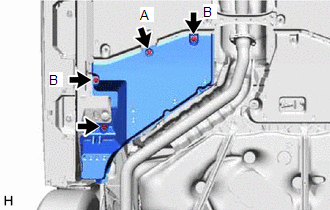
5. REMOVE NO. 1 FLOOR UNDER COVER (for HV Model)
| (a) for RH Side: (1) Remove the bolt and clip (A). (2) Disengage the 2 grommets (B) to remove the No. 1 floor under cover. |
|
6. SEPARATE NO. 2 PARKING BRAKE WIRE ASSEMBLY (w/o AVS)
| (a) Disengage the 2 clamps. |
|
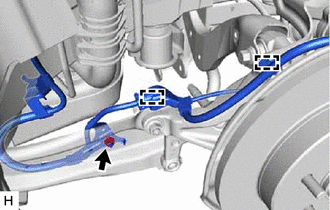
(b) Remove the nut and separate the No. 2 parking brake wire assembly from the rear trailing arm assembly.
7. SEPARATE NO. 2 PARKING BRAKE WIRE ASSEMBLY (w/ AVS)
| (a) Disconnect the connector. |
|
.png)
| (b) Remove the nut and disengage the clamp. |
|
.png)
| (c) Disengage the clamp and separate the No. 2 parking brake wire assembly from the rear flexible hose bracket. |
|
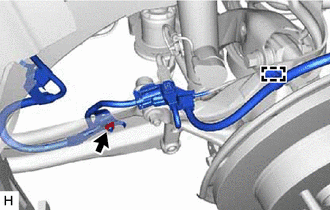
(d) Remove the nut and separate the No. 2 parking brake wire assembly from the rear trailing arm assembly.
8. REMOVE REAR STABILIZER LINK ASSEMBLY
Click here
9. REMOVE REAR TRAILING ARM ASSEMBLY
| (a) Using a transmission jack and a wooden block, support the rear No. 2 suspension arm assembly. NOTICE:
|
|

| (b) Remove the 2 bolts and separate the rear trailing arm assembly from the rear axle carrier sub-assembly. |
|
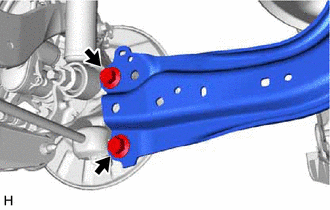
| (c) Remove the 4 bolts and rear trailing arm assembly. |
|
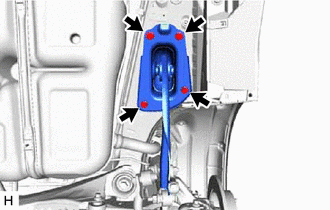
10. REMOVE REAR SUSPENSION ARM COVER
| (a) Secure the rear trailing arm assembly in a vise using aluminum plates. NOTICE: Do not overtighten the vise. |
|
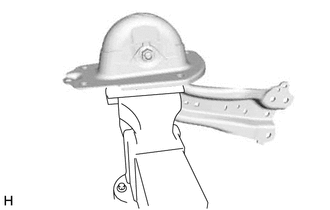
| (b) Disengage the 4 claws and remove the rear suspension arm cover. |
|
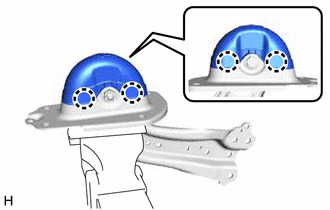
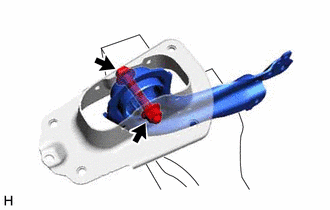
11. REMOVE REAR SUSPENSION ARM BRACKET
| (a) Remove the bolt, nut and rear suspension arm bracket from the rear trailing arm assembly. |
|
READ NEXT:
 Removal
REMOVAL CAUTION / NOTICE / HINT The necessary procedures (adjustment, calibration, initialization, or registration) that must be performed after parts are removed and installed, or replaced during rea
Installation
INSTALLATION CAUTION / NOTICE / HINT HINT:
Use the same procedure for the RH side and LH side.
The following procedure is for the LH side.
PROCEDURE 1. INSTALL REAR SUSPENSION ARM BRACKET (
Installation
INSTALLATION CAUTION / NOTICE / HINT HINT:
Use the same procedure for the RH side and LH side.
The following procedure is for the LH side.
PROCEDURE 1. INSTALL REAR SUSPENSION ARM BRACKET (
SEE MORE:
Components
COMPONENTS ILLUSTRATION *1 NO. 1 SWITCH WIRE *2 SHIFT PADDLE SWITCH (TRANSMISSION SHIFT SWITCH ASSEMBLY) *3 STEERING PAD SWITCH ASSEMBLY *4 STEERING WHEEL ASSEMBLY *5 SHIFT PADDLE SWITCH LH (TRANSMISSION SHIFT SWITCH ASSEMBLY) *6 SHIFT PADDLE SWITCH RH (TRANSMISSION SHI
Diagnostic Trouble Code Chart
DIAGNOSTIC TROUBLE CODE CHART SFI System DTC No. Detection Item MIL Memory Note Link P001001 Camshaft Position "A" Actuator Bank 1 General Electrical Failure Comes on DTC stored SAE Code: P0010 P001100 Camshaft Position "A" - Timing Over-Advanced or System Perform
