
Lexus ES: Removal
REMOVAL
PROCEDURE
1. REMOVE FRONT WHEEL OPENING EXTENSION PAD LH
Click here .gif)
2. REMOVE FRONT WHEEL OPENING EXTENSION PAD RH
Click here
3. REMOVE NO. 1 ENGINE UNDER COVER
Click here
4. DRAIN COOLANT (for Inverter)
Click here
5. REMOVE INVERTER WATER PUMP ASSEMBLY
| (a) Disconnect the inverter water pump assembly connector. To prevent coolant from entering the inverter water pump assembly connector, perform the following procedure.NOTICE: Apply insulating tape to the connectors of the wire harness and inverter water pump assembly. |
|
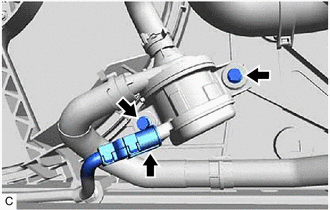
(b) Remove the 2 bolts to remove the inverter water pump assembly from the fan shroud assembly.
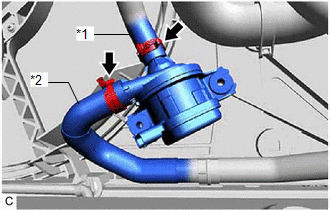
| (c) Slide the 2 clips and disconnect the No. 2 inverter cooling hose and No. 3 inverter cooling hose to remove the inverter water pump assembly. NOTICE:
|
|
READ NEXT:
 Installation
INSTALLATION PROCEDURE 1. INSTALL INVERTER WATER PUMP ASSEMBLY (a) Connect the No. 2 inverter cooling hose and No. 3 inverter cooling hose to the inverter water pump assembly and slide the 2 clips
Power Source & Network
h1 {color:red;} h2 {color:blue;} h3 {color:green;}
SEE MORE:
Telematics Transceiver Disconnected (B15DB)
DESCRIPTION If the radio receiver assembly cannot detect the DCM (telematics transceiver) for a certain period of time (90 seconds) after the engine switch is turned on (ACC) and the radio receiver assembly confirms that the information is missing by checking past DCM (telematics transceiver) recogn
Data List / Active Test
DATA LIST / ACTIVE TEST READ DATA LIST HINT: Using the Techstream to read the Data List allows the values or states of switches, sensors, actuators and other items to be read without removing any parts. This non-intrusive inspection can be very useful because intermittent conditions or signals may b
© 2016-2026 Copyright www.lexguide.net
