
Lexus ES: Removal
REMOVAL
PROCEDURE
1. REMOVE VACUUM SWITCHING VALVE (for Active Control Engine Mount System)
Click here .gif)
2. REMOVE FRONT WHEEL OPENING EXTENSION PAD RH
Click here
3. REMOVE FRONT WHEEL OPENING EXTENSION PAD LH
Click here
4. REMOVE NO. 1 ENGINE UNDER COVER
Click here
5. REMOVE NO. 2 ENGINE UNDER COVER ASSEMBLY
Click here
6. REMOVE SUSPENSION TOWER DAMPER (w/ Performance Damper)
Click here
7. REMOVE FRONT ENGINE MOUNTING INSULATOR
| (a) Disengage the 4 clamps to separate the radiator hose, vacuum hoses and No. 2 engine wire from the No. 1 radiator bracket. |
|
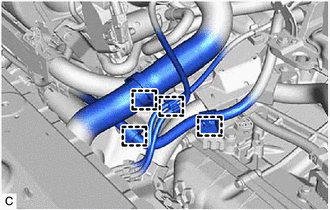
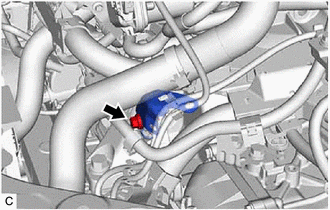
| (b) Remove the bolt and No. 1 radiator bracket from the front engine mounting bracket. |
|
| (c) Disengage the 2 clamps to separate the vacuum hoses from the front engine mounting insulator. |
|
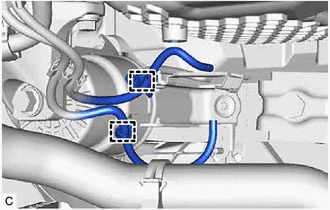
| (d) Remove the vacuum hose from the front engine mounting insulator. |
|
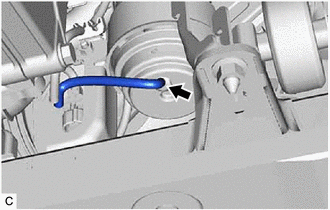
(e) Support the engine assembly with transaxle using a jack and wooden block.
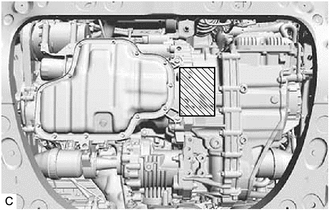
.png) | Wooden Block Placement Location |
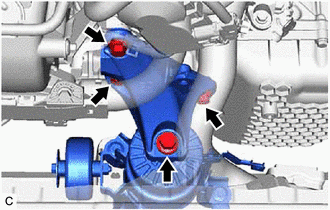
| (f) Remove the 4 bolts and front engine mounting bracket. |
|
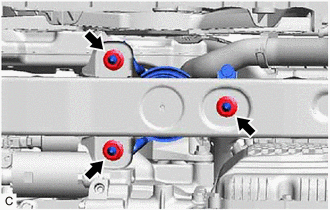
| (g) Remove the 3 nuts and front engine mounting insulator from the front frame assembly. |
|
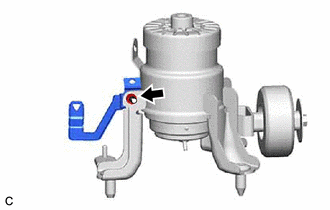
| (h) Remove the nut and stay from the front engine mounting insulator. |
|
READ NEXT:
 Installation
INSTALLATION PROCEDURE 1. INSTALL FRONT ENGINE MOUNTING INSULATOR (a) Install the stay to the front engine mounting insulator with the nut. Torque: 6.0 N·m {61 kgf·cm, 53 in·lbf} (b) Install the f
Removal
REMOVAL CAUTION / NOTICE / HINT The necessary procedures (adjustment, calibration, initialization or registration) that must be performed after parts are removed and installed, or replaced during air
SEE MORE:
Engine Failed to Start Mechanical Linkage Failure (P1C7779)
DTC SUMMARY MALFUNCTION DESCRIPTION This DTC is stored when the hybrid vehicle control ECU determines that the hybrid vehicle transaxle assembly has seized or that there is the hybrid vehicle transaxle assembly malfunction in the drivetrain. The cause of this malfunction may be one of the following:
Problem Symptoms Table
PROBLEM SYMPTOMS TABLE HINT:
Use the table below to help determine the cause of problem symptoms. If multiple suspected areas are listed, the potential causes of the symptoms are listed in order of probability in the "Suspected Area" column of the table. Check each symptom by checking the suspect
