
Lexus ES: Removal
REMOVAL
CAUTION / NOTICE / HINT
The necessary procedures (adjustment, calibration, initialization, or registration) that must be performed after parts are removed and installed, or replaced during rear television camera assembly removal/installation are shown below.
Necessary Procedure After Parts Removed/Installed/Replaced (for HV Model)| Replaced Part or Performed Procedure | Necessary Procedure | Effect/Inoperative Function When Necessary Procedures are not Performed | Link |
|---|---|---|---|
| Rear television camera assembly | w/ Parking Assist Monitor System
| Parking Assist Monitor System | |
| w/ Panoramic View Monitor System
| Panoramic View Monitor System | |
| Replaced Part or Performed Procedure | Necessary Procedure | Effect/Inoperative Function When Necessary Procedures are not Performed | Link |
|---|---|---|---|
| Rear television camera assembly | w/ Parking Assist Monitor System
| Parking Assist Monitor System | |
| w/ Panoramic View Monitor System
| Panoramic View Monitor System | |
PROCEDURE
1. REMOVE LUGGAGE COMPARTMENT DOOR OUTSIDE GARNISH SUB-ASSEMBLY
Click here .gif)
2. REMOVE TELEVISION CAMERA ASSEMBLY WITH WIRE
| (a) Disconnect the connector. |
|
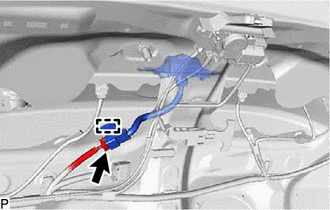
(b) Disengage the clamp.
(c) Disengage the 2 claws to remove the television camera assembly with wire as shown in the illustration.
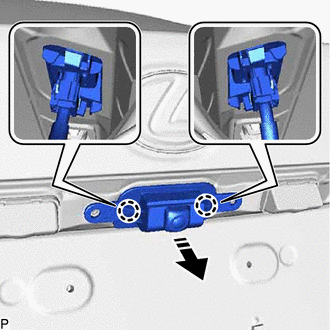
.png) | Remove in this Direction |
3. REMOVE TELEVISION CAMERA WIRE
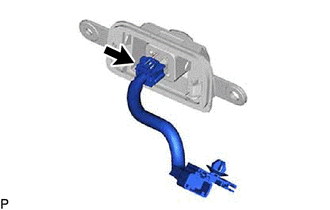
| (a) Disconnect the connector to remove the television camera wire. |
|
4. REMOVE REAR TELEVISION CAMERA ASSEMBLY
READ NEXT:
 Components
COMPONENTS ILLUSTRATION *1 FRONT CENTER ULTRASONIC SENSOR *2 FRONT CORNER ULTRASONIC SENSOR *3 FRONT CORNER ULTRASONIC SENSOR RETAINER - - ● Non-reusable part - - IL
Inspection
INSPECTION PROCEDURE 1. INSPECT FRONT CENTER ULTRASONIC SENSOR (a) Measure the resistance according to the value(s) in the table below. Standard Resistance: Tester Connection Condition Spec
SEE MORE:
Vehicle Information Unmatched (C168D)
DESCRIPTION This DTC is stored if the rear television camera assembly judges as a result of its self check that the vehicle information received from the main body ECU (multiplex network body ECU) via CAN communication and the vehicle information stored in the rear television camera assembly do not
Side Camera RH Internal Circuit (C2A62)
DESCRIPTION This DTC is stored when the parking assist ECU detects a signal indicating a malfunction in the side television camera assembly RH via CAN communication. DTC No. Detection Item DTC Detection Condition Trouble Area C2A62 Side Camera RH Internal Circuit A signal indicating
