
Lexus ES: Rear Speed Sensor (for Awd)
Components
COMPONENTS
ILLUSTRATION
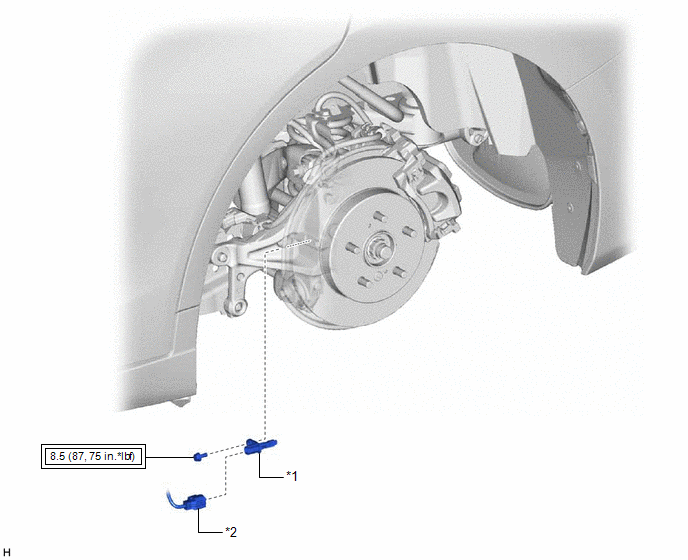
| *1 | REAR SKID CONTROL SENSOR | *2 | NO. 2 PARKING BRAKE WIRE ASSEMBLY |
.png) | Tightening torque for "Major areas involving basic vehicle performance such as moving/turning/stopping": N*m (kgf*cm, ft.*lbf) | - | - |
Installation
INSTALLATION
CAUTION / NOTICE / HINT
HINT:
- Use the same procedure for the RH side and LH side.
- The following procedure is for the LH side.
PROCEDURE
1. INSTALL REAR SKID CONTROL SENSOR
(a) Install the rear skid control sensor to the rear axle carrier sub-assembly with the bolt.
Torque:
8.5 N·m {87 kgf·cm, 75 in·lbf}
NOTICE:
- Keep the tip of the rear skid control sensor and installation hole free of foreign matter.
- Firmly insert the rear skid control sensor body into the rear axle carrier sub-assembly before tightening the bolt.
- After installing the rear skid control sensor to the rear axle carrier sub-assembly, make sure that there is no clearance between the rear skid control sensor stay and rear axle carrier sub-assembly. Also make sure that no foreign matter is stuck between the parts.
(b) Connect the No. 2 parking brake wire assembly connector to the rear skid control sensor.
2. INSTALL REAR WHEEL
Click here .gif)
3. CHECK FOR SPEED SENSOR SIGNAL
Click here
Removal
REMOVAL
CAUTION / NOTICE / HINT
HINT:
- Use the same procedure for the RH side and LH side.
- The following procedure is for the LH side.
PROCEDURE
1. REMOVE REAR WHEEL
Click here .gif)
2. REMOVE REAR SKID CONTROL SENSOR
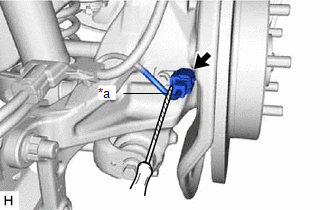
| (a) Using a screwdriver with its tip wrapped with protective tape, disconnect the No. 2 parking brake wire assembly connector from the rear skid control sensor. NOTICE:
|
|
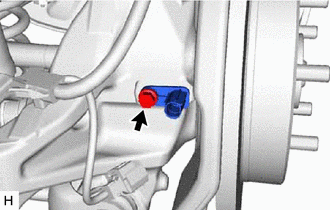
| (b) Remove the bolt and the rear skid control sensor from the rear axle carrier sub-assembly. NOTICE:
|
|
READ NEXT:
 Components
COMPONENTS ILLUSTRATION *1 NO. 2 PARKING BRAKE WIRE ASSEMBLY *2 REAR AXLE HUB AND BEARING ASSEMBLY *3 REAR DISC *4 REAR DISC BRAKE CALIPER ASSEMBLY *5 REAR FLEXIBLE HOSE *6
Installation
INSTALLATION CAUTION / NOTICE / HINT for HV Model:
When removing or installing the rear disc brake caliper assembly, pushing back the disc brake piston may cause a large clearance between the brake
SEE MORE:
Removal
REMOVAL CAUTION / NOTICE / HINT The necessary procedures (adjustment, calibration, initialization or registration) that must be performed after parts are removed and installed, or replaced during fuel pressure sensor (fuel delivery pipe with sensor assembly LH) removal/installation are shown below.
Components
COMPONENTS ILLUSTRATION *1 FUEL SUCTION TUBE WITH PUMP AND GAUGE ASSEMBLY *2 FUEL SENDER GAUGE ASSEMBLY ILLUSTRATION *1 FUEL PUMP GAUGE RETAINER *2 FUEL TANK VENT TUBE ASSEMBLY *3 NO. 2 FUEL SENDER GAUGE ASSEMBLY *4 REAR FLOOR SERVICE HOLE COVER *5 NO. 1 FUEL T
