
Lexus ES: Parts Location
PARTS LOCATION
ILLUSTRATION
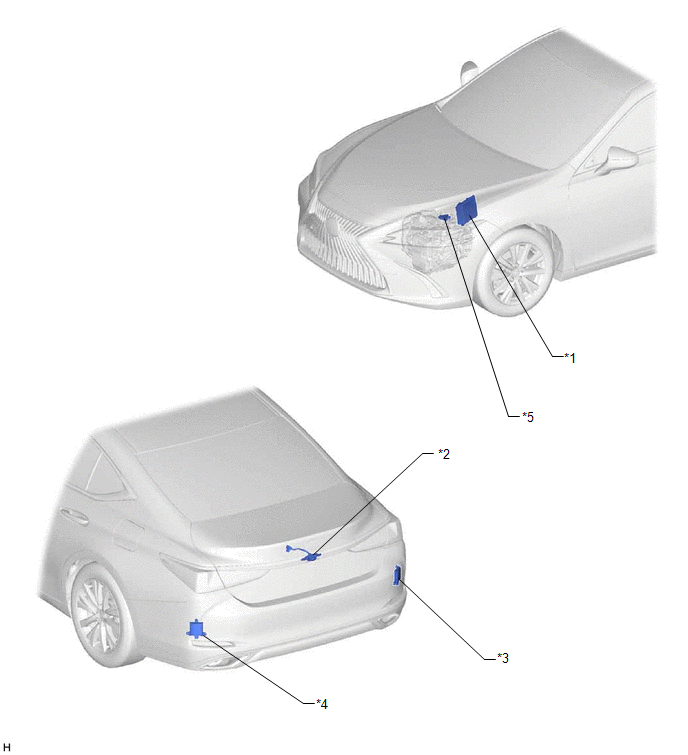
| *1 | ECM | *2 | REAR TELEVISION CAMERA ASSEMBLY |
| *3 | BLIND SPOT MONITOR SENSOR RH (w/ Blind Spot Monitor System) | *4 | BLIND SPOT MONITOR SENSOR LH (w/ Blind Spot Monitor System) |
| *5 | PARK/NEUTRAL POSITION SWITCH ASSEMBLY (for 8 inch display) | - | - |
ILLUSTRATION

| *1 | MAIN BODY ECU (MULTIPLEX NETWORK BODY ECU) | *2 | STEERING SENSOR |
| *3 | MULTI-DISPLAY ASSEMBLY | *4 | DLC3 |
| *5 | INSTRUMENT PANEL JUNCTION BLOCK ASSEMBLY - ECU-IG1 NO. 2 FUSE - ECU-DCC NO. 1 FUSE - IG1-NO. 1 RELAY - BKUP LP RELAY (for 8 inch display) | *6 | CLEARANCE WARNING ECU ASSEMBLY (w/ Parking Support Alert System) |
| *7 | RADIO RECEIVER ASSEMBLY | - | - |
READ NEXT:
 Precaution
PRECAUTION PRECAUTION FOR DISCONNECTING CABLE FROM NEGATIVE BATTERY TERMINAL NOTICE: When disconnecting the cable from the negative (-) battery terminal, initialize the following systems after the cab
Problem Symptoms Table
PROBLEM SYMPTOMS TABLE NOTICE:
The following inspection procedures for the parking assist monitor system are based on the assumption that the audio and visual system*1 or navigation system*2 is nor
Reverse Signal Circuit
DESCRIPTION The multi-display receives a reverse signal from the BK UP LP relay*1 or clearance warning ECU assembly*2.
*1: w/o Parking Support Alert System
*2: w/ Parking Support Alert System
SEE MORE:
Open in One Side of Bus 5 Branch Line
DESCRIPTION When the CAN bus main lines are normal (no open, short to ground, short to +B or short between lines) and there is an ECU or sensor on the "Communication Bus Check" screen that is indicated as not communicating or whose connection status on the "Communication Bus Check" screen changes in
Vehicle Information Unmatched (C168D)
DESCRIPTION This DTC is stored if the rear television camera assembly judges as a result of its self check that the vehicle information received from the main body ECU (multiplex network body ECU) via CAN communication and the vehicle information stored in the rear television camera assembly do not
© 2016-2026 Copyright www.lexguide.net
