
Lexus ES: On-vehicle Inspection
ON-VEHICLE INSPECTION
PROCEDURE
1. INSPECT WINDSHIELD WIPER MOTOR ASSEMBLY
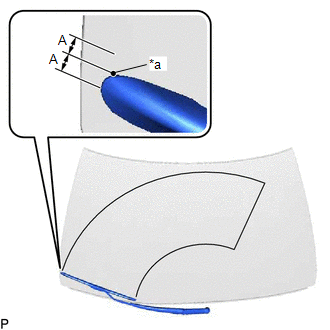
| (a) for RH Side (1) Operate the windshield wiper motor assembly. (2) Stop the windshield wiper motor assembly operation. (3) Check the automatic stop (park) position. HINT: After the front wiper motor is stopped, check the automatic stop position after lifting the wiper blade 2 times. Standard Clearance:
OK: The front wiper stops at the position shown in the illustration. |
|
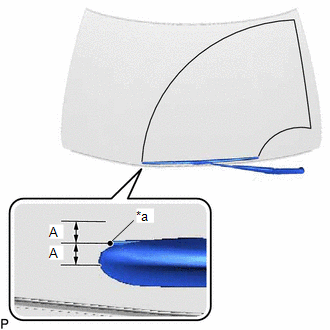
| (b) for LH Side (1) Operate the windshield wiper motor assembly. (2) Stop the windshield wiper motor assembly operation. (3) Check the automatic stop (park) position. HINT: After the front wiper motor is stopped, check the automatic stop position after lifting the wiper blade 2 times. Standard Clearance:
OK: The front wiper stops at the position shown in the illustration. |
|
READ NEXT:
 Removal
REMOVAL CAUTION / NOTICE / HINT NOTICE: Make sure to hold the front wiper arm while lifting it, as lifting the front wiper arm by the front wiper blade may damage or deform the front wiper blade. PROC
Inspection
INSPECTION CAUTION / NOTICE / HINT CAUTION: Be careful so that fingers and clothing do not get caught in the moving parts when performing this test. PROCEDURE 1. INSPECT WINDSHIELD WIPER MOTOR ASSEMBL
Installation
INSTALLATION CAUTION / NOTICE / HINT NOTICE: Make sure to hold the front wiper arm while lifting it, as lifting the front wiper arm by the front wiper blade may damage or deform the front wiper blade.
SEE MORE:
Power Retractable Mirrors do not Operate with Power Retract Mirror Switch
DESCRIPTION The outer mirror switch assembly sends the retractable outer mirror switch signal to the main body ECU (multiplex network body ECU). The main body ECU (multiplex network body ECU) then sends the mirror retract/return signal to each outer mirror control ECU assembly via CAN communication.
Motor Drive Permission Malfunction (C1451)
DESCRIPTION If air bleeding has not been performed, the skid control ECU (brake booster with master cylinder assembly) stores DTC C1451 to prevent the entry of air due to pump motor operation. DTC C1451 is stored when Motor Invalid is selected, the system will not return to normal until the air blee
