
Lexus ES: Luggage Compartment Door Outside Garnish
Components
COMPONENTS
ILLUSTRATION
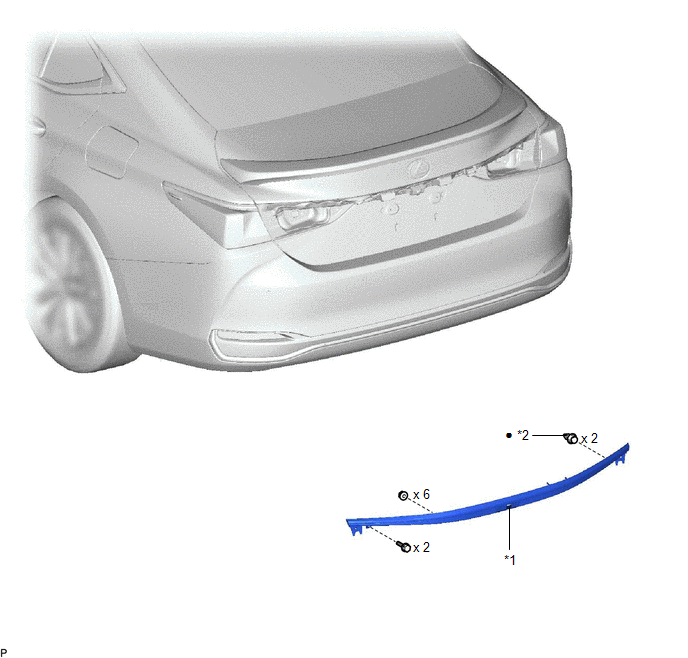
| *1 | LUGGAGE COMPARTMENT DOOR OUTSIDE GARNISH SUB-ASSEMBLY | *2 | CLIP |
| ● | Non-reusable part | - | - |
Removal
REMOVAL
PROCEDURE
1. REMOVE REAR LIGHT ASSEMBLY LH
Click here .gif)
2. REMOVE REAR LIGHT ASSEMBLY RH
HINT:
Use the same procedure as for the LH side.
3. REMOVE LUGGAGE COMPARTMENT DOOR OUTSIDE GARNISH SUB-ASSEMBLY
| (a) Remove the 2 screws. |
|
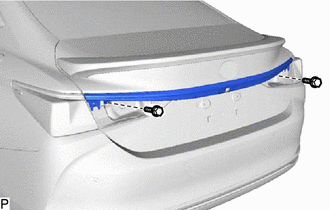
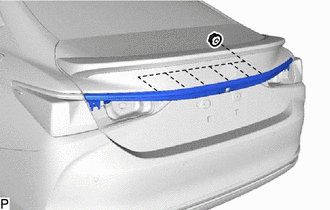
| (b) Remove the 6 nuts. |
|
(c) Apply protective tape around the luggage compartment door outside garnish sub-assembly.
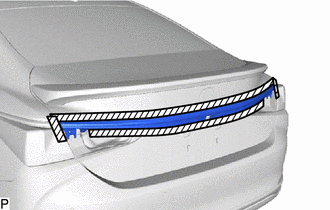
.png) | Protective Tape |
(d) Disengage the 2 clips and remove the luggage compartment door outside garnish sub-assembly as shown in the illustration.
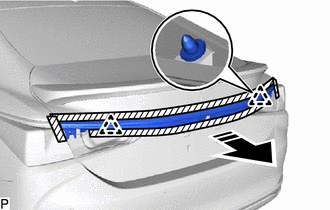
.png) | Remove in this Direction |
(e) When reusing the luggage compartment door outside garnish sub-assembly:
(1) Remove the 2 clips from the luggage compartment door outside garnish sub-assembly.
Installation
INSTALLATION
PROCEDURE
1. INSTALL LUGGAGE COMPARTMENT DOOR OUTSIDE GARNISH SUB-ASSEMBLY
(a) When reusing the luggage compartment door outside garnish sub-assembly:
(1) Install 2 new clips to the luggage compartment door outside garnish sub-assembly.
(b) Engage the 2 clips as shown in the illustration.
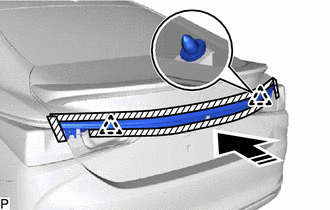
.png) | Install in this Direction |
(c) Install the 6 nuts.
(d) Install the luggage compartment door outside garnish sub-assembly with the 2 screws.
2. INSTALL REAR LIGHT ASSEMBLY LH
Click here .gif)
3. INSTALL REAR LIGHT ASSEMBLY RH
HINT:
Use the same procedure as for the LH side.
READ NEXT:
 Components
COMPONENTS ILLUSTRATION *A for Gasoline Model *B for Mesh Type Radiator Grille *1 NO. 3 LUGGAGE COMPARTMENT DOOR PLATE *2 SYMBOL EMBLEM ● Non-reusable part - - ILLUS
Removal
REMOVAL CAUTION / NOTICE / HINT HINT: When removing a name plate or emblem, heat the vehicle body and name plate or emblem using a heat light. Heating Temperature Item Temperature Vehicle Bod
SEE MORE:
Taillight Relay Circuit
DESCRIPTION The main body ECU (multiplex network body ECU) controls the operation of the TAIL relay. WIRING DIAGRAM CAUTION / NOTICE / HINT NOTICE:
Inspect the fuses for circuits related to this system before performing the following procedure.
Before replacing the main body ECU (multiplex net
Master Cylinder Pressure Circuit (C1786)
DESCRIPTION The absorber control ECU stores this DTC when a malfunction signal from the master cylinder pressure sensor built into the brake actuator assembly is received via CAN communication. DTC No. Detection Item DTC Detection Condition Trouble Area Warning Indicate Memory C1786
