
Lexus ES: Installation
INSTALLATION
PROCEDURE
1. INSTALL NAVIGATION ECU
2. INSTALL NO. 1 RADIO RECEIVER BRACKET
(a) Install the No. 1 radio receiver bracket with the 2 screws.
3. INSTALL NAVIGATION ECU WITH BRACKET
(a) Engage the 4 claws to temporarily install the navigation ECU with bracket as shown in the illustration.
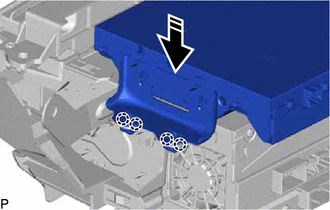
.png) | Install in this Direction |
| (b) Install the 2 screws. |
|
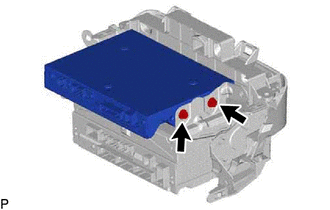
| (c) Install the navigation ECU with bracket with the 2 screws. |
|
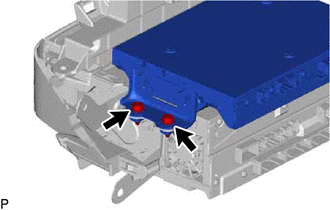
4. INSTALL NO. 1 NAVIGATION WIRE
(a) Connect the 2 connectors to install the No. 1 navigation wire.
5. INSTALL RADIO RECEIVER ASSEMBLY WITH SWITCH
Click here .gif)
6. INSTALL LOWER INSTRUMENT PANEL SUB-ASSEMBLY
Click here
7. INSTALL LOWER INSTRUMENT PANEL LH
Click here
8. INSTALL NO. 2 INSTRUMENT PANEL UNDER COVER SUB-ASSEMBLY
Click here
9. INSTALL INSTRUMENT SIDE PANEL RH
Click here
10. INSTALL FRONT DOOR OPENING TRIM COVER RH
HINT:
Use the same procedure as for the LH side.
Click here
11. INSTALL COWL SIDE TRIM BOARD RH
HINT:
Use the same procedure as for the LH side.
Click here
12. INSTALL FRONT DOOR SCUFF PLATE RH
HINT:
Use the same procedure as for the LH side.
Click here
13. INSTALL LOWER INSTRUMENT PANEL
Click here
14. INSTALL UPPER CONSOLE PANEL SUB-ASSEMBLY
Click here
15. INSTALL REAR UPPER CONSOLE PANEL SUB-ASSEMBLY
Click here
16. INSTALL SHIFT LEVER KNOB SUB-ASSEMBLY
for UA80E: Click here
for P710: Click here
17. INSTALL CENTER INSTRUMENT CLUSTER FINISH PANEL SUB-ASSEMBLY
Click here
18. INSTALL INSTRUMENT PANEL FINISH PANEL END RH
Click here
19. INSTALL INSTRUMENT PANEL FINISH PANEL END LH
Click here
READ NEXT:
 Installation
INSTALLATION PROCEDURE 1. INSTALL NAVIGATION ECU 2. INSTALL NO. 1 RADIO RECEIVER BRACKET (a) Install the No. 1 radio receiver bracket with the 2 screws. 3. INSTALL NAVIGATION ECU WITH BRACKET (a) Enga
Removal
REMOVAL PROCEDURE 1. PRECAUTION (for HV Model) NOTICE:
When replacing the radio receiver assembly or navigation ECU, always replace it with a new one. If a radio receiver assembly or navigation ECU
Removal
REMOVAL PROCEDURE 1. PRECAUTION (for HV Model) NOTICE:
When replacing the radio receiver assembly or navigation ECU, always replace it with a new one. If a radio receiver assembly or navigation ECU
SEE MORE:
Lost Communication With ECM/PCM "A" (U0100,...,U1117)
DESCRIPTION These DTCs are stored if a CAN communication malfunction occurs between the main body ECU (multiplex network body ECU) and other ECUs. DTC No. Detection Item DTC Detection Condition Trouble Area DTC Output from U0100 Lost Communication With ECM/PCM "A" The main body EC
USB Audio System Recognition/Play Error
DESCRIPTION When a USB device or "iPod" is connected to the USB jack of the No. 1 stereo jack adapter assembly, it must have playable files. The device must also communicate with and be recognized by the radio receiver assembly. This diagnostic procedure is for when a device is not recognized, or fi
