
Lexus ES: Installation
INSTALLATION
PROCEDURE
1. INSTALL STEERING WHEEL SWITCH HOUSING
(a) When reusing the steering wheel switch housing:
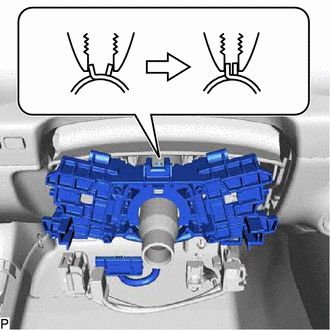
| (1) Using pliers, expand the clamp and temporarily install the steering wheel switch housing as shown in the illustration. |
|
(2) While holding the clamp expanded, engage the claw as shown in the illustration.
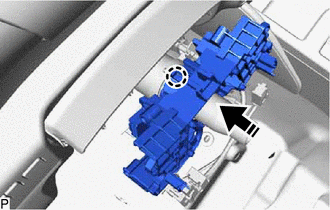
.png) | Install in this Direction |
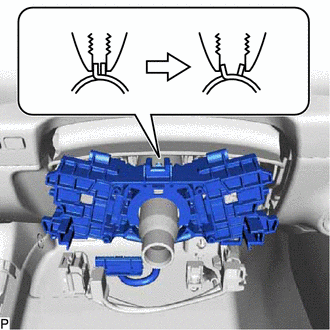
| (3) Release the clamp to install the steering wheel switch housing as shown in the illustration. |
|
(b) When installing a new steering wheel switch housing:
| (1) Temporarily install the steering wheel switch housing. |
|
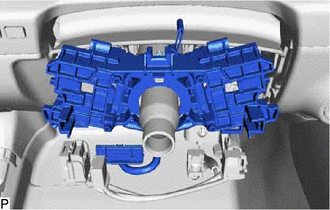
(2) Engage the claw as shown in the illustration.
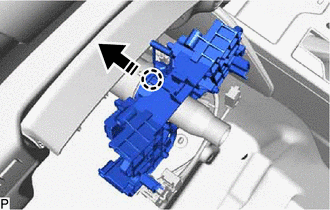
| | Install in this Direction |
(3) Remove the pin to install the steering wheel switch housing as shown in the illustration.
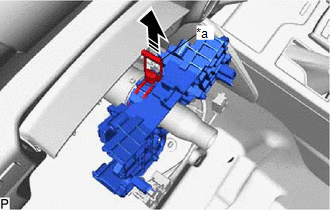
| *a | Pin |
| | Remove in this Direction |
2. INSTALL TURN SIGNAL SWITCH
Click here .gif)
3. INSTALL WINDSHIELD WIPER SWITCH ASSEMBLY
Click here
4. INSTALL TILT AND TELESCOPIC SWITCH (for Power Tilt and Power Telescopic Steering Column)
Click here
5. INSTALL SPIRAL CABLE WITH SENSOR SUB-ASSEMBLY
Click here
READ NEXT:
 Components
COMPONENTS ILLUSTRATION *A for Driver Side *B for Front Passenger Side *1 COURTESY LIGHT ASSEMBLY *2 FRONT DOOR TRIM BOARD SUB-ASSEMBLY *3 MULTIPLEX NETWORK MASTER SWITCH ASS
SEE MORE:
Problem Symptoms Table
PROBLEM SYMPTOMS TABLE HINT:
Use the table below to help determine the cause of problem symptoms. If multiple suspected areas are listed, the potential causes of the symptoms are listed in order of probability in the "Suspected Area" column of the table. Check each symptom by checking the suspect
Indicator (Red) Circuit Short to Ground (B157011,B157013)
DESCRIPTION This DTC is stored when the DCM (telematics transceiver) detects an open or short in the manual (SOS) switch red indicator circuit of the manual (SOS) switch. The manual (SOS) switch red indicator illuminates for 2 seconds and goes off when the power switch is turned on (IG). If a malfun
