
Lexus ES: Installation
INSTALLATION
PROCEDURE
1. INSTALL BATTERY
(a) w/ Battery Insulator
(1) Install the battery insulator to the battery.
(b) Install the battery to the vehicle.
(c) Install the No. 2 battery clamp to the battery clamp sub-assembly with the bolt.
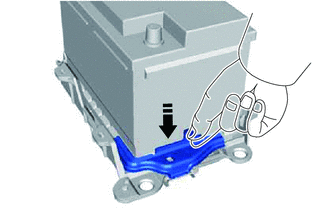
.png) |
Remove in this Direction |
Torque:
18.5 N·m {189 kgf·cm, 14 ft·lbf}
(d) Connect the cable to the positive (+) battery terminal and tighten the nut.
Torque:
5.4 N·m {55 kgf·cm, 48 in·lbf}
(e) Engage the 2 claws to install the battery terminal cap to the positive (+) battery terminal.
2. CONNECT CABLE TO NEGATIVE BATTERY TERMINAL
(a) Connect the cable to the negative (-) battery terminal and tighten the nut.
Torque:
5.4 N·m {55 kgf·cm, 48 in·lbf}
NOTICE:
When disconnecting the cable, some systems need to be initialized after the cable is reconnected.
Click here .gif)
READ NEXT:
 2gr-fks Coolant
Components
COMPONENTS
ILLUSTRATION
*1
RADIATOR CAP SUB-ASSEMBLY
*2
RADIATOR DRAIN COCK PLUG
*3
NO. 1 ENGINE UNDER COVER
2gr-fks Drive Belt
Components
COMPONENTS
ILLUSTRATION
*1
FRONT FENDER APRON SEAL RH
*2
V-RIBBED BELT
N*m (kgf*cm, ft.*lbf): Specified torque
SEE MORE:
Intermediate Shaft Speed Sensor "A" Circuit Short to Battery (P079112,P079114,P079131)
DESCRIPTION The transmission revolution sensor (NC) detects the rotation speed of the counter gear which shows the output shaft speed of automatic transaxle assembly. Based on the transmission revolution sensor (NC) signal and the transmission revolution sensor (NT) signal, the ECM controls engine t
Precaution
PRECAUTION PRECAUTION FOR DISCONNECTING CABLE FROM NEGATIVE AUXILIARY BATTERY TERMINAL NOTICE: When disconnecting the cable from the negative (-) auxiliary battery terminal, initialize the following systems after the cable is reconnected. System Name See Procedure Lane Control System (for H
