
Lexus ES: Inspection
INSPECTION
PROCEDURE
1. INSPECT FRONT DOOR ILLUMINATION LIGHT LH (FRONT DOOR OUTSIDE HANDLE ASSEMBLY LH)
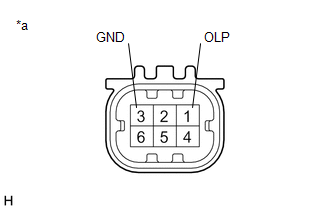
| *a | Component without harness connected (Front Door Illumination Light LH (Front Door Outside Handle Assembly LH)) |
(a) Connect 4 dry-cell batteries (1.5 V) in series.
NOTICE:
Do not use rechargeable batteries as they may not output a voltage of 1.5 V.
(b) Apply 6.0 V battery voltage to the front door illumination light LH (front door outside handle assembly LH) and check that the light illuminates.
OK:
| Measurement Condition | Specified Condition |
|---|---|
| Positive (+) lead from the batteries → Terminal 1 (OLP) Negative (-) lead from the batteries → Terminal 3 (GND) | Illumination light illuminates |
If the result is not as specified, replace the front door illumination light LH (front door outside handle assembly LH).
2. INSPECT FRONT DOOR ILLUMINATION LIGHT RH (FRONT DOOR OUTSIDE HANDLE ASSEMBLY RH)
| *a | Component without harness connected (Front Door Illumination Light RH (Front Door Outside Handle Assembly RH)) |
(a) Connect 4 dry-cell batteries (1.5 V) in series.
NOTICE:
Do not use rechargeable batteries as they may not output a voltage of 1.5 V.
(b) Apply 6.0 V battery voltage to the front door illumination light RH (front door outside handle assembly RH) and check that the light illuminates.
OK:
| Measurement Condition | Specified Condition |
|---|---|
| Positive (+) lead from the batteries → Terminal 1 (OLP) Negative (-) lead from the batteries → Terminal 3 (GND) | Illumination light illuminates |
If the result is not as specified, replace the front door illumination light RH (front door outside handle assembly RH).
READ NEXT:
 Installation
INSTALLATION CAUTION / NOTICE / HINT HINT:
Use the same procedure for the RH side and LH side.
The following procedure is for the LH side.
PROCEDURE 1. INSTALL FRONT DOOR ILLUMINATION LIGHT (F
Components
COMPONENTS ILLUSTRATION *1 COURTESY LIGHT ASSEMBLY *2 REAR DOOR ILLUMINATION LIGHT (REAR DOOR OUTSIDE HANDLE ASSEMBLY) *3 REAR DOOR SERVICE HOLE COVER *4 REAR DOOR TRIM BOARD SUB-A
SEE MORE:
Definition Of Terms
DEFINITION OF TERMS Term Definition Monitor Description Description of what the skid control ECU (brake booster with master cylinder assembly) monitors and how it detects malfunctions (monitoring purpose and details). Related DTCs Group of diagnostic trouble codes that are output by
Hybrid Generator Circuit Current Out of Range (P1CA51D)
DTC SUMMARY MALFUNCTION DESCRIPTION This DTC indicates that current does not flow as commanded due to a generator output circuit malfunction. The cause of this malfunction may be one of the following: Area Main Malfunction Description Inside of inverter Inverter with converter assembly in
