
Lexus ES: Inspection
INSPECTION
CAUTION / NOTICE / HINT
NOTICE:
- When using a vise, place aluminum plates between the part and vise.
- When using a vise, do not overtighten it.
PROCEDURE
1. INSPECT REAR DRIVE SHAFT ASSEMBLY
| (a) Check that there is no excessive play in the radial direction of the outboard joint. |
|
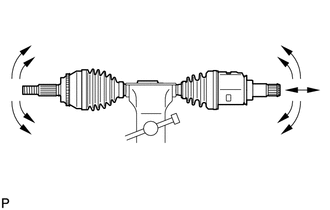
(b) Check that the inboard joint slides smoothly in the thrust direction.
(c) Check that there is no excessive play in the radial direction of the inboard joint.
(d) Check the boots for damage.
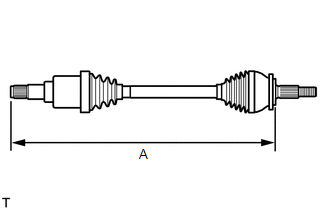
| (e) Check whether the drive shaft dimension (A) is within specification. Length (A): 749.1 to 759.1 mm (2.46 to 2.49 ft.) NOTICE: Keep the drive shaft assembly level during inspection. If the boots are stretched or contracted, correct them. |
|
READ NEXT:
 Installation
INSTALLATION CAUTION / NOTICE / HINT HINT:
Use the same procedure for the RH and LH sides.
The procedure listed below is for the LH side.
PROCEDURE 1. INSTALL REAR DRIVE SHAFT INBOARD JOINT SH
Reassembly
REASSEMBLY CAUTION / NOTICE / HINT NOTICE:
When using a vise, place aluminum plates between the part and vise.
When using a vise, do not overtighten it.
HINT:
Use the same procedure for the
Removal
REMOVAL CAUTION / NOTICE / HINT The necessary procedures (adjustment, calibration, initialization, or registration) that must be performed after parts are removed and installed, or replaced during rea
SEE MORE:
Headlight Dimmer Switch Circuit
DESCRIPTION The steering sensor receives the following switch information:
Light control switch in DRL OFF*, tail, head or AUTO position
Dimmer switch in high, low or high flash (pass) position
*: w/ DRL OFF Switch
WIRING DIAGRAM CAUTION / NOTICE / HINT NOTICE: Before replacing the ma
Engine
ENGINE
HINT:
Perform these procedures after the engine has cooled down.
INSPECT DRIVE BELT
(a) Inspect the drive belt.
2GR-FKS: Click here
INSPECT ENGINE OIL
(a) Inspect the engine oil.
A25A-FXS: Click here
2GR-FKS: Click here
REPLACE ENGINE OIL AND OIL FILTER
(a) Replace the engine
© 2016-2026 Copyright www.lexguide.net
