
Lexus ES: Front seats
The seats can be adjusted (longitudinally, vertically, etc.). Adjust the seat to ensure the correct driving posture.
Adjustment procedure
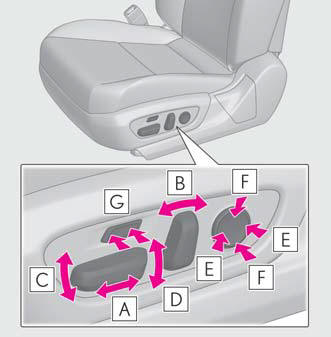
- Seat position adjustment
- Seatback angle adjustment
- Seat cushion (front) angle adjustment
- Vertical height adjustment
- Lumbar support adjustment
- Pelvic support adjustment (if equipped)
- Seat cushion length adjustment (if equipped)
■When adjusting the seat
- Make sure that no surrounding passengers or objects are in contact with the seat.
- Take care when adjusting the seat so that the head restraint does not touch the ceiling.
■Power easy access system (if equipped) The driver's seat and steering wheel move in accordance with power switch mode and the driver's seat belt condition.
WARNING
■When adjusting the seat position
- Take care when adjusting the seat position to ensure that other passengers are not injured by the moving seat.
- Do not put your hands under the seat
or near the moving parts to avoid
injury.
Fingers or hands may become jammed in the seat mechanism.
- Make sure to leave enough space around the feet so they do not get stuck.
■Seat adjustment To reduce the risk of sliding under the lap belt during a collision, do not recline the seat more than necessary.
If the seat is too reclined, the lap belt may slide past the hips and apply restraint forces directly to the abdomen, or your neck may contact the shoulder belt, increasing the risk of death or serious injury in the event of an accident.
Adjustments should not be made while driving as the seat may unexpectedly move and cause the driver to lose control of the vehicle.
READ NEXT:
 Driving position memory
This feature automatically adjusts
the positions of the driver's seat,
steering wheel (power adjustment
type), outside rear view mirrors and
head-up display (if equipped) to
make entering and exi
Head restraints
Head restraints are provided for all
seats.
WARNING
■Head restraint precautions
Observe the following precautions
regarding the head restraints. Failure to
do so may result in death or serious
SEE MORE:
PBD/PTL Closer Operation (B2250)
DESCRIPTION DTC B2250 is stored when there is a malfunction in the closer pulse sensor circuit of the luggage door closer assembly and when a normal waveform is not input for the closer pulse during power trunk lid operation. DTC No. Detection Item DTC Detection Condition Trouble Area B
Diagnostic Trouble Code Chart
DIAGNOSTIC TROUBLE CODE CHART Active Noise Control System DTC No. Detection Item Link B1AA044 ANC ECU EEPROM Data Memory Failure B1AA187 UART Communication Between ANC and Audio Amplifier Missing Message B1AA296 Front Left Microphone Circuit Component Internal Fail
