
Lexus ES: Components
COMPONENTS
ILLUSTRATION
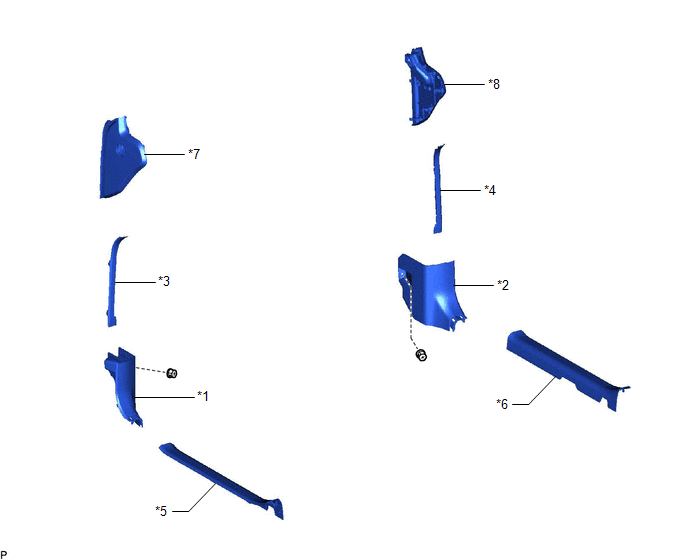
| *1 | COWL SIDE TRIM BOARD LH | *2 | COWL SIDE TRIM BOARD RH |
| *3 | FRONT DOOR OPENING TRIM COVER LH | *4 | FRONT DOOR OPENING TRIM COVER RH |
| *5 | FRONT DOOR SCUFF PLATE LH | *6 | FRONT DOOR SCUFF PLATE RH |
| *7 | INSTRUMENT SIDE PANEL LH | *8 | INSTRUMENT SIDE PANEL RH |
ILLUSTRATION
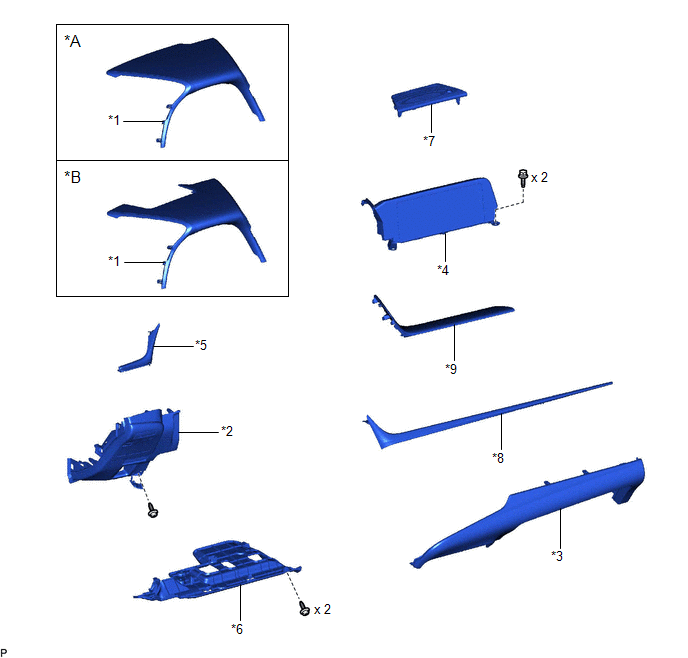
| *A | w/o Headup Display | *B | w/ Headup Display |
| *1 | INSTRUMENT CLUSTER FINISH PANEL SUB-ASSEMBLY | *2 | LOWER INSTRUMENT PANEL FINISH PANEL SUB-ASSEMBLY |
| *3 | LOWER INSTRUMENT PANEL SUB-ASSEMBLY | *4 | MULTI-DISPLAY ASSEMBLY WITH CLOCK |
| *5 | NO. 1 INSTRUMENT CLUSTER MOULDING | *6 | NO. 1 INSTRUMENT PANEL UNDER COVER SUB-ASSEMBLY |
| *7 | NO. 1 SPEAKER OPENING COVER ASSEMBLY | *8 | NO. 2 INSTRUMENT CLUSTER MOULDING |
| *9 | UPPER INSTRUMENT PANEL FINISH PANEL SUB-ASSEMBLY | - | - |
ILLUSTRATION
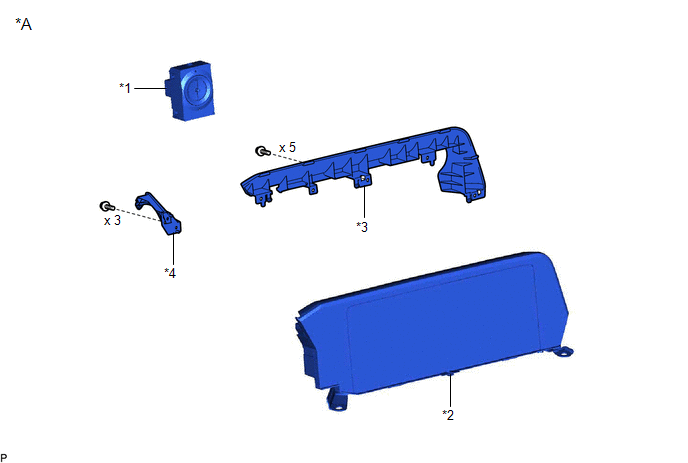
| *A | for 8 Inch Display | - | - |
| *1 | CLOCK ASSEMBLY | *2 | MULTI-DISPLAY ASSEMBLY |
| *3 | MULTI-MEDIA MODULE COVER | *4 | NO. 1 SUB-CLUSTER MODULE PANEL |
ILLUSTRATION
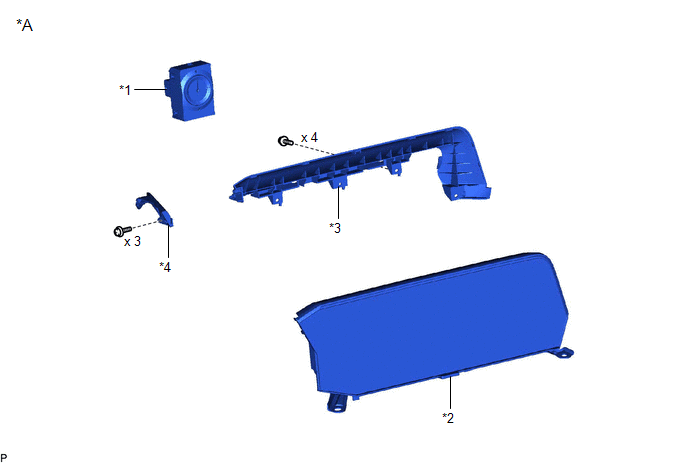
| *A | for 12.3 Inch Display | - | - |
| *1 | CLOCK ASSEMBLY | *2 | MULTI-DISPLAY ASSEMBLY |
| *3 | MULTI-MEDIA MODULE COVER | *4 | NO. 1 SUB-CLUSTER MODULE PANEL |
READ NEXT:
 Installation
INSTALLATION PROCEDURE 1. INSTALL MULTI-DISPLAY ASSEMBLY 2. INSTALL CLOCK ASSEMBLY Click here 3. INSTALL MULTI-MEDIA MODULE COVER (a) for 8 Inch Display: (1) Engage the 6 guides and 3 claws as shown
Removal
REMOVAL PROCEDURE 1. REMOVE FRONT DOOR SCUFF PLATE LH Click here 2. REMOVE COWL SIDE TRIM BOARD LH Click here 3. REMOVE FRONT DOOR OPENING TRIM COVER LH Click here 4. REMOVE INSTRUMENT SIDE PANE
SEE MORE:
Luggage Compartment Door Closer does not Operate
DESCRIPTION The luggage compartment door closer operation controls the luggage door closer assembly via the luggage closer motor assembly based on switch signals in the luggage door closer assembly. WIRING DIAGRAM CAUTION / NOTICE / HINT NOTICE:
Check that B2250 or B2251 is not output before pro
Customize Parameters
CUSTOMIZE PARAMETERS CUSTOMIZE BLIND SPOT MONITOR SYSTEM (a) Customizing with the Techstream NOTICE:
When the customer requests a change in a function, first make sure that the function can be customized.
Be sure to make a note of the current settings before customizing.
When troubleshooting
