
Lexus ES: Components
Lexus ES (XZ10) Service Manual / Power Source & Network / Power Distribution / Main Body Ecu / Components
COMPONENTS
ILLUSTRATION
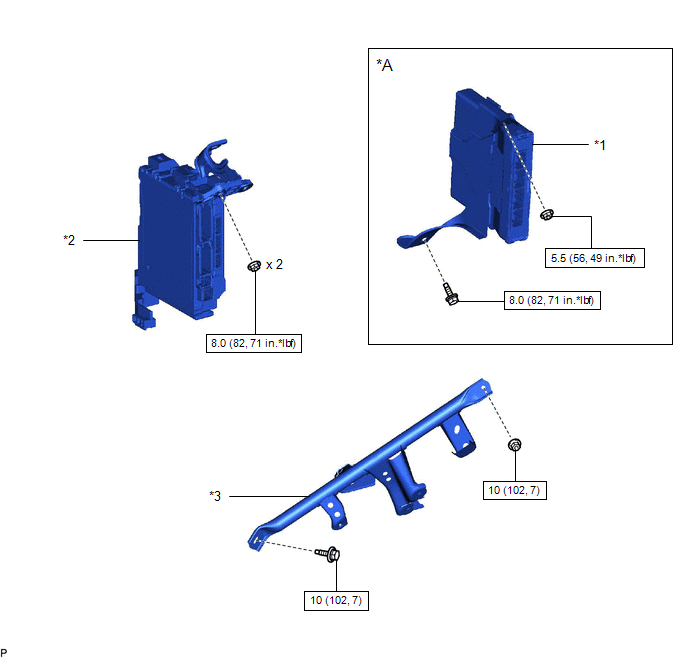
| *A | for HV Model | - | - |
| *1 | HYBRID VEHICLE CONTROL ECU | *2 | INSTRUMENT PANEL JUNCTION BLOCK ASSEMBLY WITH MAIN BODY ECU |
| *3 | NO. 3 INSTRUMENT PANEL TO COWL BRACE SUB-ASSEMBLY | - | - |
 | N*m (kgf*cm, ft.*lbf): Specified torque | - | - |
ILLUSTRATION
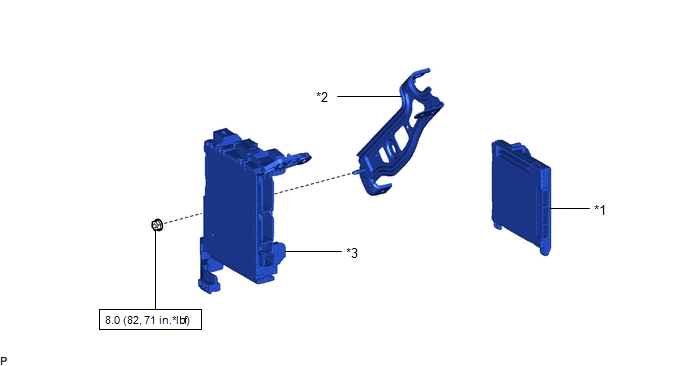
| *1 | MAIN BODY ECU (MULTIPLEX NETWORK BODY ECU) | *2 | WIRING HARNESS CLAMP BRACKET |
| *3 | INSTRUMENT PANEL JUNCTION BLOCK ASSEMBLY | - | - |
| | N*m (kgf*cm, ft.*lbf): Specified torque | - | - |
READ NEXT:
 Installation
INSTALLATION CAUTION / NOTICE / HINT PROCEDURE 1. INSTALL CENTRAL GATEWAY ECU (NETWORK GATEWAY ECU) (a) Engage the 2 claws to install the central gateway ECU (network gateway ECU) as shown in the illu
SEE MORE:
Coolant
ComponentsCOMPONENTS ILLUSTRATION *1 RADIATOR CAP SUB-ASSEMBLY *2 RADIATOR DRAIN COCK PLUG *3 NO. 1 ENGINE UNDER COVER - - ReplacementREPLACEMENT CAUTION / NOTICE / HINT CAUTION: Do not remove the radiator cap sub-assembly or radiator drain cock plug while the engine and rad
Utility
UTILITY NOTICE: If the forward recognition camera has been replaced due to a malfunction in the road sign assist system, be sure to perform forward recognition camera adjustment. Otherwise all systems that use the forward recognition camera may be affected. HINT: Forward recognition camera adjustmen
© 2016-2026 Copyright www.lexguide.net
