
Lexus ES: Components
COMPONENTS
ILLUSTRATION
.png)
| *1 | FRONT CENTER UPPER SUSPENSION BRACE SUB-ASSEMBLY | - | - |
.png) | Tightening torque for "Major areas involving basic vehicle performance such as moving/turning/stopping": N*m (kgf*cm, ft.*lbf) | .png) | N*m (kgf*cm, ft.*lbf): Specified torque |
| *T1 | Bolt color black: 8.0 N*m (82 kgf*cm, 71 in.*lbf) Bolt color silver: 8.9 N*m (91 kgf*cm, 79 in.*lbf) | - | - |
ILLUSTRATION
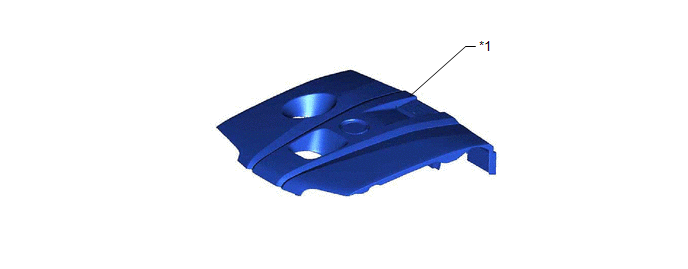
| *1 | NO. 1 ENGINE COVER SUB-ASSEMBLY | - | - |
ILLUSTRATION
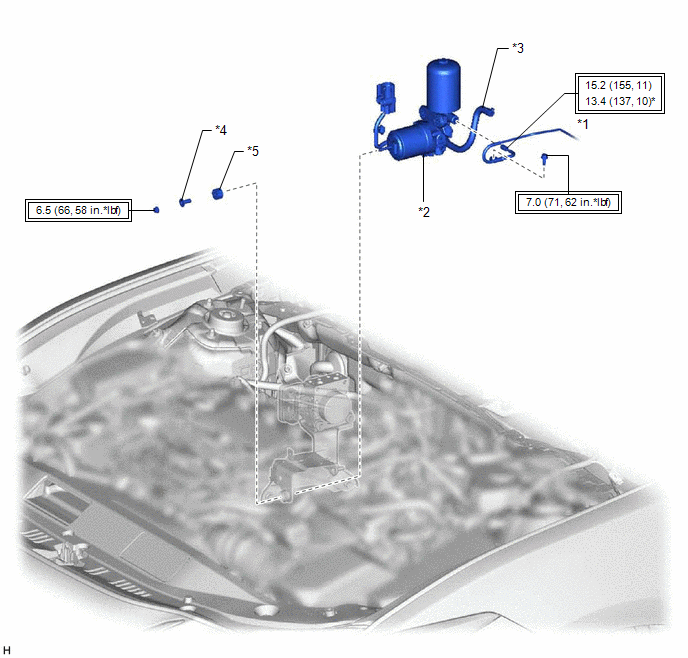
| *1 | ACCUMULATOR TO BRAKE MASTER CYLINDER TUBE | *2 | BRAKE BOOSTER PUMP ASSEMBLY |
| *3 | NO. 2 BRAKE ACTUATOR HOSE | *4 | BRAKE ACTUATOR CASE COLLAR |
| *5 | BRAKE BOOSTER PUMP BUSHING | - | - |
| | Tightening torque for "Major areas involving basic vehicle performance such as moving/turning/stopping": N*m (kgf*cm, ft.*lbf) | * | For use with a union nut wrench |
ILLUSTRATION
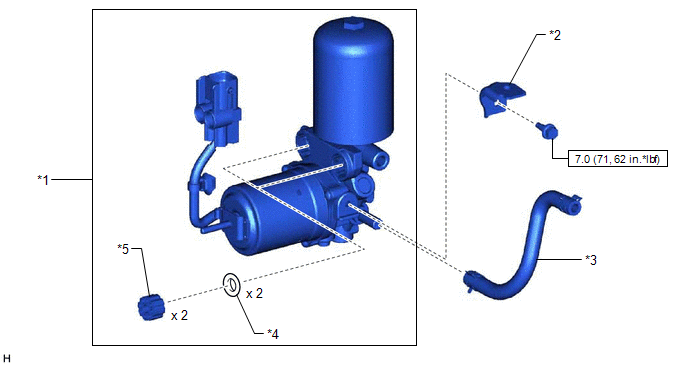
| *1 | BRAKE BOOSTER PUMP ASSEMBLY | *2 | NO. 1 BRAKE TUBE CLAMP BRACKET |
| *3 | NO. 2 BRAKE ACTUATOR HOSE | *4 | BRAKE BOOSTER PUMP COLLAR |
| *5 | BRAKE BOOSTER PUMP BUSHING | - | - |
| | N*m (kgf*cm, ft.*lbf): Specified torque | - | - |
READ NEXT:
 Disposal
DISPOSAL PROCEDURE 1. DISPOSE OF BRAKE BOOSTER PUMP ASSEMBLY (a) Remove the accumulator from the brake booster pump assembly. (b) Secure the accumulator in a vise. (c) Using a hacksaw, make a cut in t
Inspection
INSPECTION PROCEDURE 1. INSPECT BRAKE BOOSTER PUMP ASSEMBLY (a) Measure the resistance according to the value(s) in the table below. Standard Resistance: Tester Connection Condition Specifi
Installation
INSTALLATION PROCEDURE 1. INSTALL NO. 1 BRAKE TUBE CLAMP BRACKET (a) Install the No. 1 brake tube clamp bracket to the brake booster pump assembly with the bolt. Torque: 7.0 N·m {71 kgf·cm, 62 in·
SEE MORE:
Hybrid/EV Battery Stack 1 Current Interrupt Device Circuit Open (P1AC413)
DTC SUMMARY MALFUNCTION DESCRIPTION Current interrupt devices (CIDs), which mechanically shut off the high-voltage circuit, are installed in each HV battery cell to protect the HV battery from overcharge (overvoltage). The cause of this malfunction may be one of the following: Battery ECU assembly
Front Right Microphone Circuit Component Internal Failure (B1AA696,B1AA71C)
DESCRIPTION These DTCs are stored when a malfunction occurs in the No. 2 active noise control microphone system. DTC No. Detection Item DTC Detection Condition Trouble Area B1AA696 Front Right Microphone Circuit Component Internal Failure Stereo component equalizer assembly detects
