
Lexus ES: Components
COMPONENTS
ILLUSTRATION
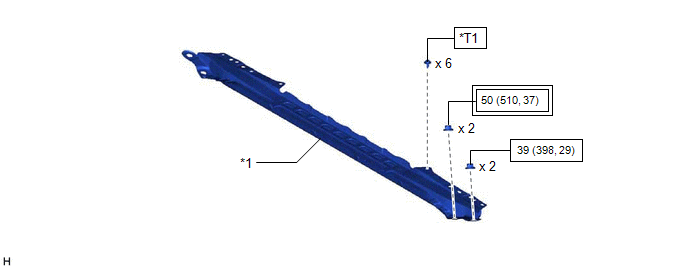
| *1 | FRONT CENTER UPPER SUSPENSION BRACE SUB-ASSEMBLY | - | - |
.png) | Tightening torque for "Major areas involving basic vehicle performance such as moving/turning/stopping": N*m (kgf*cm, ft.*lbf) |  | N*m (kgf*cm, ft.*lbf): Specified torque |
| *T1 | Bolt color black: 8.0 N*m (82 kgf*cm, 71 in.*lbf) Bolt color silver: 8.9 N*m (91 kgf*cm, 79 in.*lbf) | - | - |
ILLUSTRATION
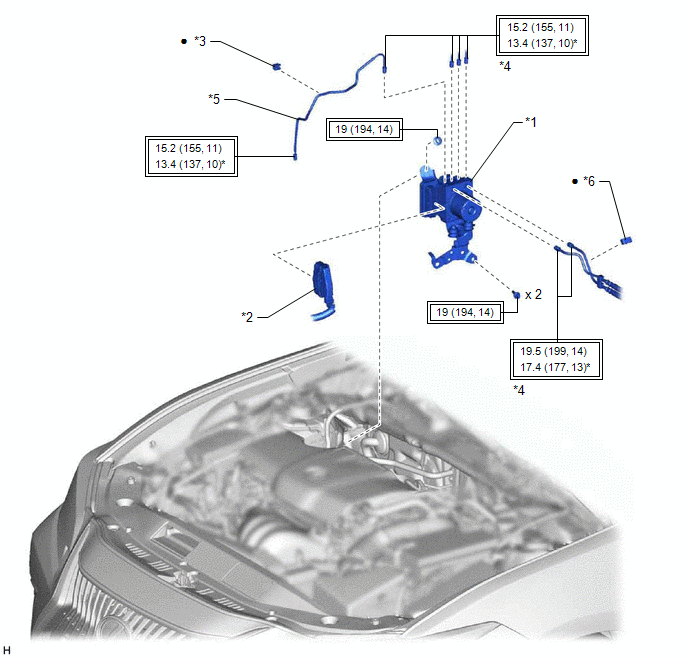
| *1 | BRAKE ACTUATOR WITH BRACKET | *2 | CONNECTOR |
| *3 | BRAKE TUBE CLAMP | *4 | BRAKE LINE |
| *5 | FRONT NO. 3 BRAKE TUBE | *6 | NO. 4 BRAKE TUBE CLAMP |
| | Tightening torque for "Major areas involving basic vehicle performance such as moving/turning/stopping": N*m (kgf*cm, ft.*lbf) | * | For use with a union nut wrench |
| ● | Non-reusable part | - | - |
ILLUSTRATION
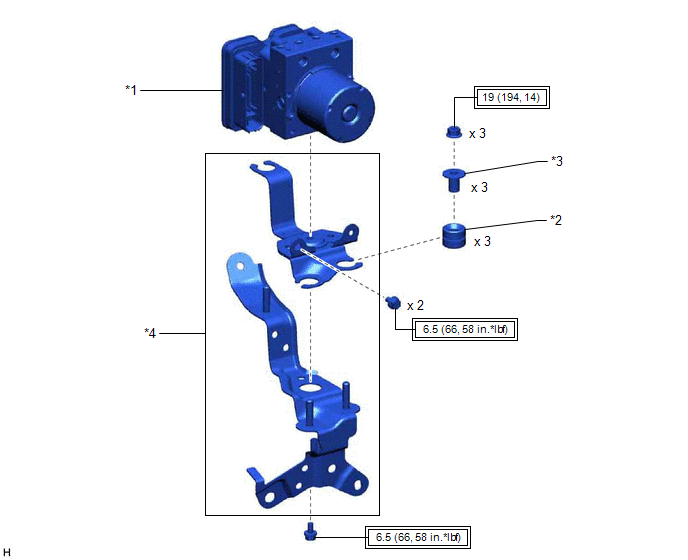
| *1 | BRAKE ACTUATOR ASSEMBLY | *2 | BRAKE ACTUATOR BRACKET CUSHION |
| *3 | NO. 2 BRAKE ACTUATOR CASE COLLAR | *4 | BRAKE ACTUATOR BRACKET ASSEMBLY |
| | Tightening torque for "Major areas involving basic vehicle performance such as moving/turning/stopping": N*m (kgf*cm, ft.*lbf) | - | - |
READ NEXT:
 Installation
INSTALLATION CAUTION / NOTICE / HINT HINT: The parking brake indicator light blinks (red) when the engine switch is turned on (IG) after replacing the brake actuator assembly. Operate the electric par
On-vehicle Inspection
ON-VEHICLE INSPECTION PROCEDURE 1. CONNECT TECHSTREAM (a) Connect the Techstream to the DLC3 with the ignition switch off. (b) Start the engine and run it at idle. (c) Turn the Techstream on. (d) Ente
Removal
REMOVAL CAUTION / NOTICE / HINT The necessary procedures (adjustment, calibration, initialization or registration) that must be performed after parts are removed and installed, or replaced during brak
SEE MORE:
Components
COMPONENTS ILLUSTRATION *1 REAR SEAT INNER BELT ASSEMBLY LH *2 REAR CENTER SEAT LAP TYPE BELT ASSEMBLY *3 WASHER *4 REAR SEAT CUSHION ASSEMBLY *5 REAR SEAT CUSHION LOCK HOOK - - Tightening torque for "Major areas involving basic vehicle performance such as moving
Components
COMPONENTS ILLUSTRATION *1 VACUUM HOSE *2 FLOW SHUTTING VALVE (NO. 1 WATER BY-PASS HOSE) *3 WATER BY-PASS HOSE ASSEMBLY *4 STEERING GEAR HEAT INSULATOR *5 WIRE HARNESS *6 FRONT FRAME ASSEMBLY *7 TRANSMISSION BREATHER CLAMP *8 HOSE CLAMP Tightening torqu
