
Lexus ES: System Diagram
SYSTEM DIAGRAM
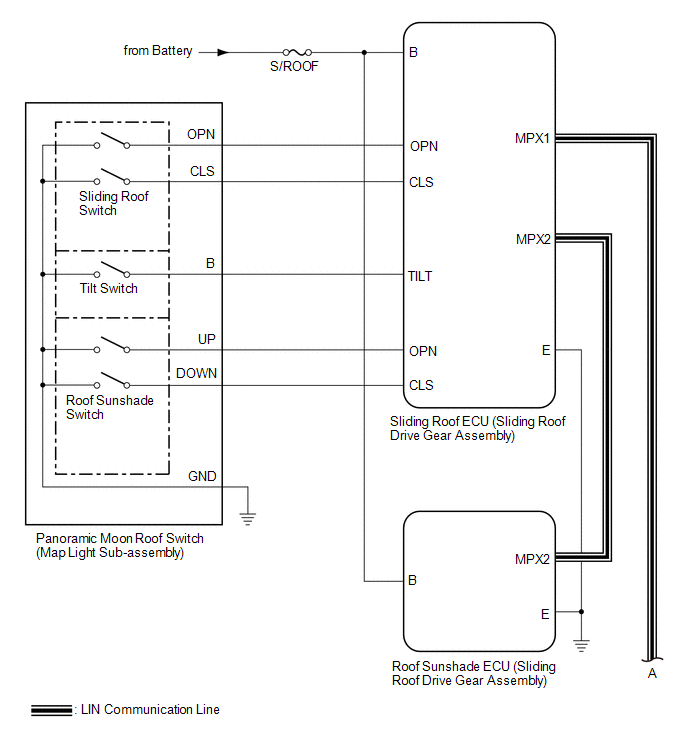
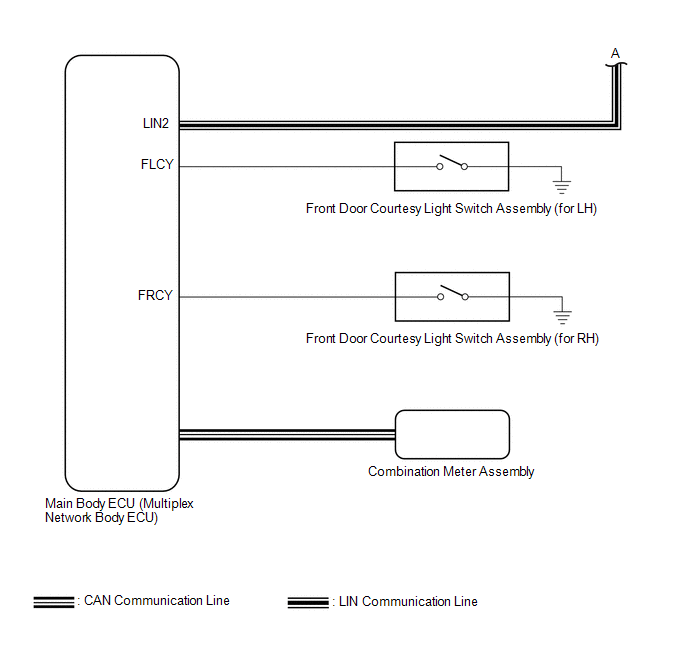 Communication Table
 | Sender | Receiver | Signal | Line |
|---|---|---|---|
| Main Body ECU (Multiplex Network Body ECU) | Sliding Roof ECU (Sliding Roof Drive Gear Assembly) |
| LIN |
| Main Body ECU (Multiplex Network Body ECU) | Roof Sunshade ECU (Sliding Roof Drive Gear Assembly) |
| LIN |
| Sliding Roof ECU (Sliding Roof Drive Gear Assembly) | Main Body ECU (Multiplex Network Body ECU) | Sliding roof glass position signal | LIN |
| Sliding Roof ECU (Sliding Roof Drive Gear Assembly) | Roof Sunshade ECU (Sliding Roof Drive Gear Assembly) |
| LIN |
| Roof Sunshade ECU (Sliding Roof Drive Gear Assembly) | Sliding Roof ECU (Sliding Roof Drive Gear Assembly) |
| LIN |
| Combination Meter Assembly | Main Body ECU (Multiplex Network Body ECU) | Vehicle speed signal | CAN |
| Main Body ECU (Multiplex Network Body ECU) | Combination Meter Assembly | Sliding roof open warning request signal | CAN |
READ NEXT:
 System Description
SYSTEM DESCRIPTION PANORAMIC MOON ROOF SYSTEM DESCRIPTION (a) The panoramic moon roof system controls the sliding roof operation using the sliding roof ECU (sliding roof drive gear assembly) and roof
How To Proceed With Troubleshooting
CAUTION / NOTICE / HINT HINT:
Use the following procedure to troubleshoot the panoramic moon roof system.
*: Use the Techstream.
PROCEDURE 1. VEHICLE BROUGHT TO WORKSHOP
NEXT
Operation Check
OPERATION CHECK CHECK AUTO OPERATION FUNCTION (FOR SLIDING ROOF) NOTICE:
Make sure that initialization has been completed before performing this inspection.
Click here
The sliding roof auto ope
SEE MORE:
Components
COMPONENTS ILLUSTRATION *1 FUEL DELIVERY PIPE SUB-ASSEMBLY *2 O-RING *3 FUEL TUBE SUB-ASSEMBLY *4 INJECTOR VIBRATION INSULATOR *5 NO. 1 DELIVERY PIPE SPACER *6 PORT FUEL INJECTOR ASSEMBLY *7 NO. 5 ENGINE WIRE *8 FUEL PIPE CLAMP Tightening torque for "Ma
License Plate Light Assembly
ComponentsCOMPONENTS ILLUSTRATION *1 LICENSE PLATE LIGHT ASSEMBLY - - RemovalREMOVAL CAUTION / NOTICE / HINT HINT:
Use the same procedure for the RH side and LH side.
The following procedure is for the LH side.
PROCEDURE 1. REMOVE LUGGAGE COMPARTMENT DOOR OUTSIDE GARNISH SUB-A
