
Lexus ES: On-vehicle Inspection
ON-VEHICLE INSPECTION
PROCEDURE
1. INSPECT RAIN SENSOR
| (a) Disconnect the rain sensor connector. |
|
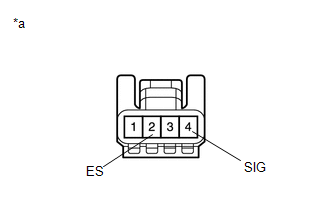
(b) Measure the voltage according to the value(s) in the table below.
Standard Voltage:
| Tester Connection | Condition | Specified Condition |
|---|---|---|
| 4 (SIG) - 2 (ES) | Engine switch on (IG) | 11 to 14 V |
(c) Measure the resistance according to the value(s) in the table below.
Standard Resistance:
| Tester Connection | Condition | Specified Condition |
|---|---|---|
| 2 (ES) - Body ground | Always | Below 1 Ω |
HINT:
If the result is not as specified, replace the rain sensor.
| (d) Reconnect the rain sensor connector. |
|
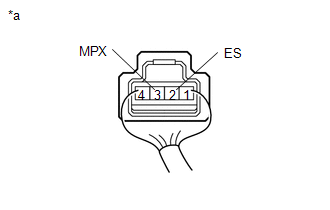
(e) Connect an oscilloscope to terminal 3 (MPX) and 2 (ES) of the rain sensor connector.
(f) Check for pulses according to the value(s) in the table below.
OK:
| Tester Connection | Condition | Specified Condition |
|---|---|---|
| 3 (MPX) - 2 (ES) | Engine switch on (IG) Front wiper switch in auto | Pulse generation |
HINT:
If the result is not as specified, replace the rain sensor.
READ NEXT:
 Removal
REMOVAL PROCEDURE 1. REMOVE RAIN SENSOR COVER *a Stopper Remove in this Direction (1) Remove in this Direction (2) (a) Release the stopper by pulling it out and disconnect the r
Installation
INSTALLATION PROCEDURE 1. INSTALL RAIN SENSOR TAPE HINT: The rain sensor tape is reusable. Only replace the tape if it is damaged or contaminated with foreign matter. (a) Clean the sensing portion of
Relay
On-vehicle InspectionON-VEHICLE INSPECTION PROCEDURE 1. INSPECT WIPER RELAY (a) Measure the resistance according to the value(s) in the table below. Standard Resistance: Tester Connection Co
SEE MORE:
Steering Angle Sensor Failure (C1626)
DESCRIPTION
This DTC is stored if the parking assist ECU receives a signal via CAN communication from the steering sensor that indicates an internal malfunction.
This DTC is stored if the rear television camera assembly receives a signal via CAN communication from the steering sensor that indic
Hybrid/EV Battery Discharge Control Malfunction (P300000)
DESCRIPTION The hybrid vehicle control ECU alerts the driver and performs fail-safe control based on error signals received from the battery voltage sensor. This DTC is stored when the SOC (state of charge) of the HV battery has dropped excessively as a result of leaving shift lever in N, running ou
