
Lexus ES: Installation
INSTALLATION
CAUTION / NOTICE / HINT
HINT:
for Side:- Use the same procedure for the RH side and LH side.
- The following procedure is for the LH side.
PROCEDURE
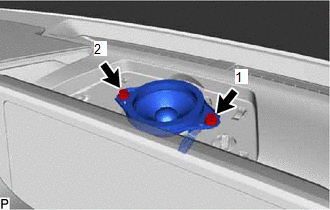
1. INSTALL FRONT NO. 3 SPEAKER ASSEMBLY (for Center)
NOTICE:
Do not touch the speaker cone.
(a) Connect the connector.
| (b) Install the front No. 3 speaker assembly with the 2 bolts. HINT: Install the bolts in the order shown in the illustration. |
|
2. INSTALL NO. 1 SPEAKER OPENING COVER ASSEMBLY (for Center)
Click here .gif)
3. INSTALL FRONT NO. 2 SPEAKER ASSEMBLY (for Side)
NOTICE:
Do not touch the speaker cone.
(a) Connect the connector.
(b) Install the front No. 2 speaker assembly with the 2 bolts.
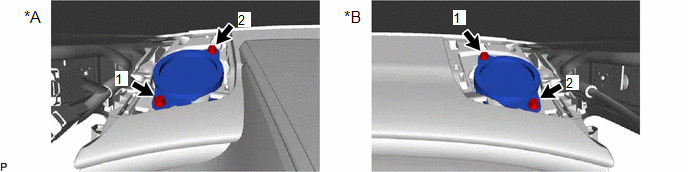
| *A | for LH Side | *B | for RH Side |
HINT:
Install the bolts in the order shown in the illustration.
4. INSTALL NO. 1 INSTRUMENT PANEL SPEAKER PANEL SUB-ASSEMBLY (for Side)
Click here
5. INSTALL FRONT PILLAR GARNISH ASSEMBLY (for Side)
Click here
6. INSTALL FRONT DOOR OPENING TRIM COVER (for Side)
Click here
7. INSTALL COWL SIDE TRIM BOARD (for Side)
Click here
8. INSTALL FRONT DOOR SCUFF PLATE (for Side)
Click here
READ NEXT:
 Removal
REMOVAL CAUTION / NOTICE / HINT HINT: for Side:
Use the same procedure for the RH side and LH side.
The following procedure is for the LH side.
PROCEDURE 1. REMOVE FRONT DOOR SCUFF PLATE (for
Components
COMPONENTS ILLUSTRATION *1 TELEPHONE MICROPHONE ASSEMBLY - -
SEE MORE:
Operation Check
OPERATION CHECK CHECK DOOR OPEN LINKED WIPER SUSPEND FUNCTION (w/ Auto Wiper System) (a) Continuously apply water to the windshield glass in front of the rain sensor. (b) Turn the engine switch on (IG). (c) Move the windshield wiper switch assembly to the AUTO position and check that the front wiper
Dtc Check / Clear
DTC CHECK / CLEAR CHECK DTC (a) Connect the Techstream to the DLC3. (b) Turn the engine switch on (IG). (c) Turn the Techstream on. (d) Enter the following menus: Body Electrical > Road Sign Assist > Trouble Codes (e) Check for DTCs (Test Failed / Pending / Confirmed). Techstream Display
