
Lexus ES: Installation
Lexus ES (XZ10) Service Manual / Drivetrain / Axle And Differential / Differential Mount Cushion / Installation
INSTALLATION
PROCEDURE
1. INSTALL REAR NO. 1 DIFFERENTIAL MOUNT CUSHION
(a) Using SST, install a new rear No. 1 differential mount cushion.
SST: 09316-12010
SST: 09570-24011
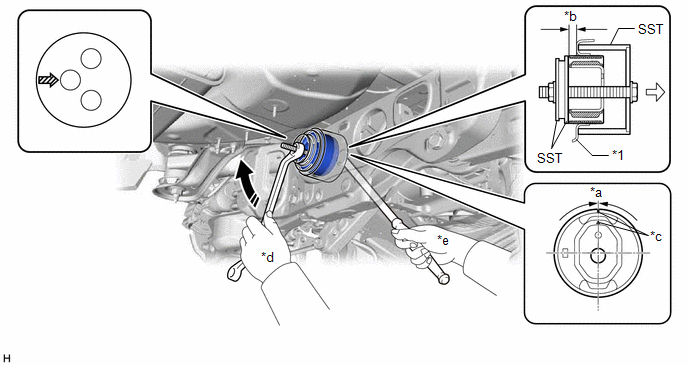
| *1 | Rear Suspension Member Sub-assembly | - | - |
| *a | -3° to 3° | *b | 9.8 to 10.8 mm (0.3858 to 0.4252 in.) |
| *c | Protrusion | *d | Turn |
| *e | Hold | - | - |
 | Turning Direction |  | Front of Vehicle |
 | SST Bolt Position | - | - |
NOTICE:
- Make sure that the rear No. 1 differential mount cushion is aligned within 3° from the center.
- Install the rear No. 1 differential mount cushion so that the protrusion is positioned as shown in the illustration.
- Be sure to use the correct combination of SST.
- Before using SST, apply grease to SST bolt.
- Temporarily install the rear No. 1 differential mount cushion to the rear suspension member sub-assembly in order to prevent it from tilting, and then install SST.
- Make sure that SST contacts the entire circumference of the rear No. 1 differential mount cushion.
- Do not tilt the SST bolt.
2. INSTALL DIFFERENTIAL CARRIER ASSEMBLY
Click here .gif)
READ NEXT:
 Removal
REMOVAL CAUTION / NOTICE / HINT The necessary procedures (adjustment, calibration, initialization, or registration) that must be performed after parts are removed and installed, or replaced during rea
Differential Oil
ComponentsCOMPONENTS ILLUSTRATION *1 REAR DIFFERENTIAL FILLER PLUG *2 REAR DIFFERENTIAL DRAIN PLUG *3 GASKET - - N*m (kgf*cm, ft.*lbf): Specified torque ● Non-reusabl
Differential System
PrecautionPRECAUTION
Before disassembling the differential assembly, thoroughly clean it by removing any sand, mud or foreign matter. This will help prevent contamination during disassembly and re
SEE MORE:
Installation
INSTALLATION CAUTION / NOTICE / HINT NOTICE: This procedure includes the installation of small-head bolts. Refer to Small-Head Bolts of Basic Repair Hint to identify the small-head bolts. Click here PROCEDURE 1. INSTALL NO. 2 FUEL PRESSURE SENSOR HINT: Perform "Inspection After Repair" after repla
Evaporative Emission System Incorrect Purge Flow Actuator Stuck On (P04417E,P04417F,P04419C)
DTC SUMMARY DTC No. Detection Item DTC Detection Condition Trouble Area MIL Memory Note P04417E Evaporative Emission System Incorrect Purge Flow Actuator Stuck On The stabilized EVAP system pressure is higher than [second reference pressure x 0.2] and the purge VSV is judged a
© 2016-2026 Copyright www.lexguide.net
