
Lexus ES: High Mounted Stop Light Assembly
Components
COMPONENTS
ILLUSTRATION
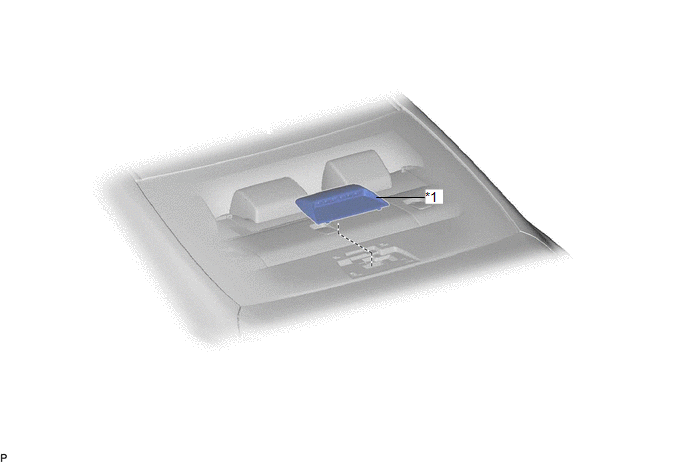
| *1 | CENTER STOP LIGHT SET | - | - |
Removal
REMOVAL
PROCEDURE
1. REMOVE CENTER STOP LIGHT SET
(a) Disengage the 4 guides as shown in the illustration.
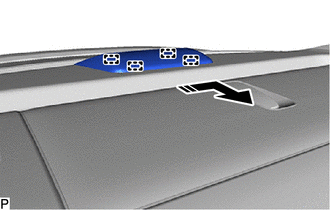
.png) | Disengage in this Direction |
(b) Turn the center stop light set as shown in the illustration.
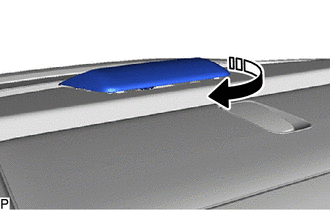
| | Turn in this Direction |
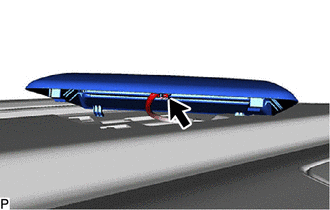
| (c) Disconnect the connector to remove the center stop light set. |
|
Inspection
INSPECTION
PROCEDURE
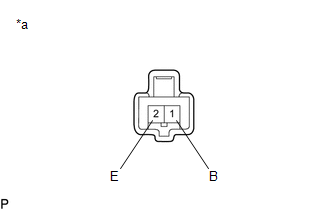
1. INSPECT CENTER STOP LIGHT SET
| (a) Apply auxiliary battery voltage to the center stop light set and check that the light illuminates. OK:
If the result is not as specified, replace the center stop light set. |
|
Installation
INSTALLATION
PROCEDURE
1. INSTALL CENTER STOP LIGHT SET
(a) Connect the connector.
(b) Turn the center stop light set as shown in the illustration.
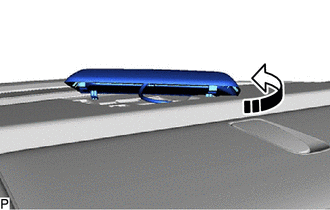
.png) | Turn in this Direction |
(c) Engage the 4 guides as shown in the illustration to install the center stop light set.
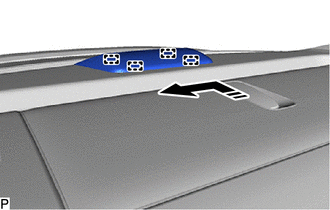
| | Install in this Direction |
READ NEXT:
 Components
COMPONENTS ILLUSTRATION *A for Driver Side *B for Front Passenger Side *1 COURTESY LIGHT ASSEMBLY *2 FRONT DOOR ILLUMINATION LIGHT (FRONT DOOR OUTSIDE HANDLE ASSEMBLY) *3 FRO
Removal
REMOVAL CAUTION / NOTICE / HINT The necessary procedures (adjustment, calibration, initialization or registration) that must be performed after parts are removed and installed, or replaced during fron
SEE MORE:
Back Camera Disconnected (C1622)
DESCRIPTION This DTC is stored if the radio receiver assembly judges that the signals or signal lines between the rear television camera assembly and the multi-display assembly are not normal as a result of its self check. DTC No. Detection Item DTC Detection Condition Trouble Area C162
Removal
REMOVAL PROCEDURE 1. REMOVE FRONT DOOR SCUFF PLATE LH Click here 2. REMOVE COWL SIDE TRIM BOARD LH Click here 3. REMOVE FRONT DOOR OPENING TRIM COVER LH Click here 4. REMOVE INSTRUMENT SIDE PANEL LH Click here 5. REMOVE NO. 1 INSTRUMENT PANEL UNDER COVER SUB-ASSEMBLY Click here 6. REMOVE L
