
Lexus ES: System Diagram
SYSTEM DIAGRAM
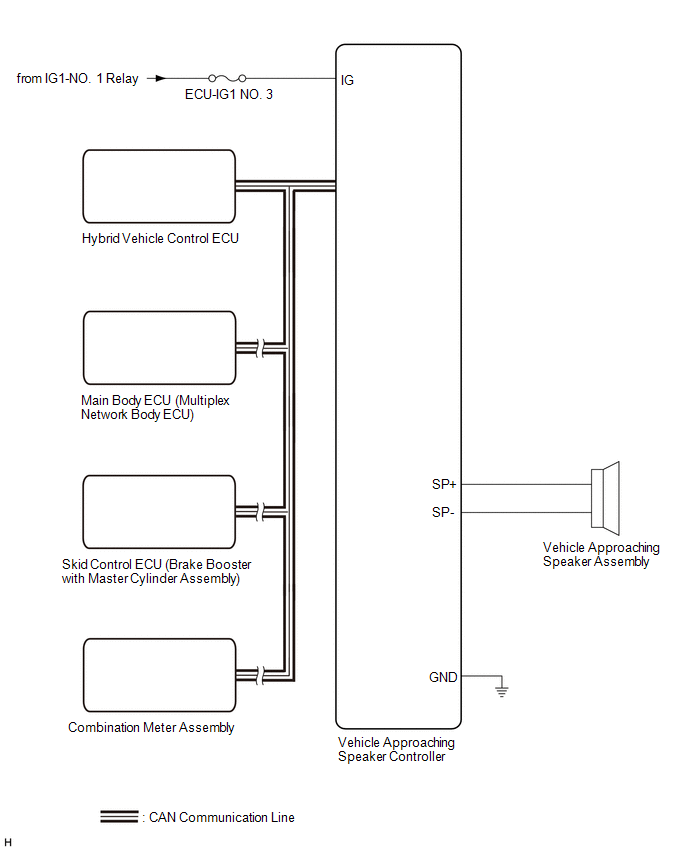
READ NEXT:
 System Description
SYSTEM DESCRIPTION Vehicle Proximity Notification System (a) When the vehicle is being driven quietly using the motor only, the vehicle proximity notification system outputs a warning sound from the v
How To Proceed With Troubleshooting
CAUTION / NOTICE / HINT HINT:
Use the following procedure to troubleshoot the vehicle proximity notification system.
*: Use the Techstream.
PROCEDURE 1. VEHICLE BROUGHT TO WORKSHOP
Operation Check
OPERATION CHECK VEHICLE PROXIMITY NOTIFICATION SYSTEM OPERATION CHECK (a) System operation check (vehicle stopped) (1) Apply the parking brake. (2) Turn the power switch on (IG). (3) With the brake pe
SEE MORE:
Vehicle Control History
VEHICLE CONTROL HISTORY CHECK VEHICLE CONTROL HISTORY HINT:
The vehicle control history data stores the history of the reject function and system protection operations.
The number of occurrences, date and distance are stored in batches for each item.
(a) Connect the Techstream to the DLC3. (
Automatic High Beam Switch Indicator does not Come ON
DESCRIPTION When the automatic high beam system is on, the steering sensor illuminates the automatic high beam switch indicator. WIRING DIAGRAM PROCEDURE 1. READ VALUE USING TECHSTREAM (a) Connect the Techstream to the DLC3. (b) Turn the power switch on (IG). (c) Turn the Techstream on. (d
© 2016-2026 Copyright www.lexguide.net
