
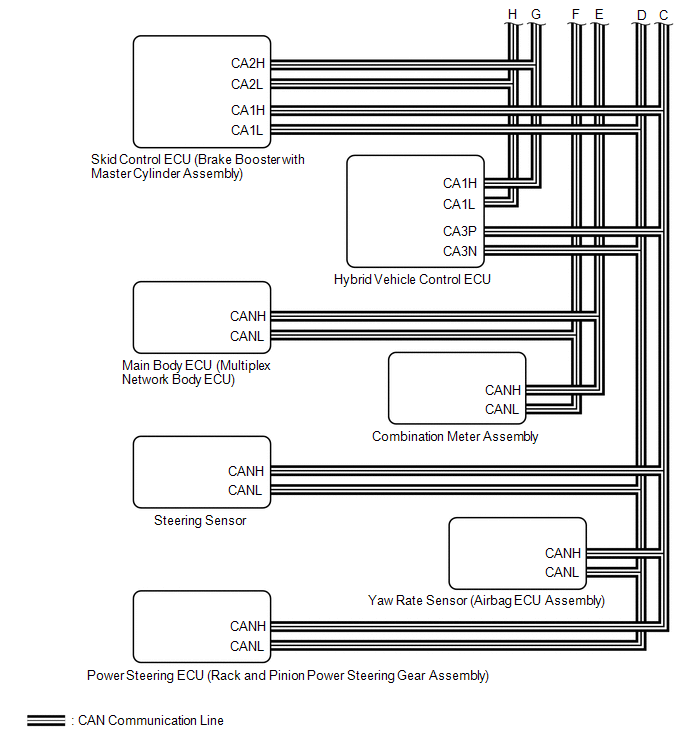
Lexus ES: System Diagram
Lexus ES (XZ10) Service Manual / Engine & Hybrid System / Cruise Control / Lane Control System (for Hv Model) / System Diagram
SYSTEM DIAGRAM
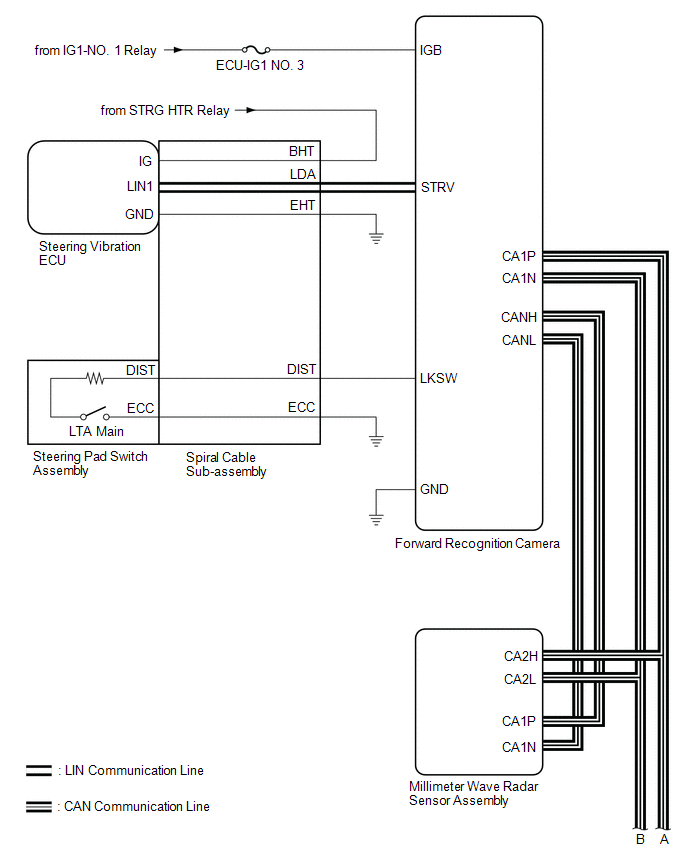
.png)
READ NEXT:
 How To Proceed With Troubleshooting
CAUTION / NOTICE / HINT HINT:
Use the following procedure to troubleshoot the lane control system.
*: Use the Techstream.
PROCEDURE 1. VEHICLE BROUGHT TO WORKSHOP
NEXT
Customize Parameters
CUSTOMIZE PARAMETERS CUSTOMIZE LTA NOTICE:
When the customer requests a change in a function, first make sure that the function can be customized.
Be sure to make a note of the current settings b
Problem Symptoms Table
PROBLEM SYMPTOMS TABLE HINT:
If CAN communication system and lane control system DTCs are not output and any of the following problem symptoms exist, perform troubleshooting by checking the appropr
SEE MORE:
Back-up Light Circuit
DESCRIPTION The hybrid vehicle control ECU controls the back-up lights via the BKUP LP relay. WIRING DIAGRAM CAUTION / NOTICE / HINT NOTICE:
Inspect the fuses for circuits related to this system before performing the following procedure.
Before replacing the hybrid vehicle control ECU, refer t
"E" Camshaft Position Actuator Bank 1 Signal Invalid (P136629)
DESCRIPTION Refer to DTC P001001. Click here DTC No. Detection Item DTC Detection Condition Trouble Area MIL Memory Note P136629 "E" Camshaft Position Actuator Bank 1 Signal Invalid Malfunction in diagnostic signal (VTM) of cam timing control motor with EDU assembly is detec
© 2016-2026 Copyright www.lexguide.net
