
Lexus ES: Power Window Master Switch
Components
COMPONENTS
ILLUSTRATION
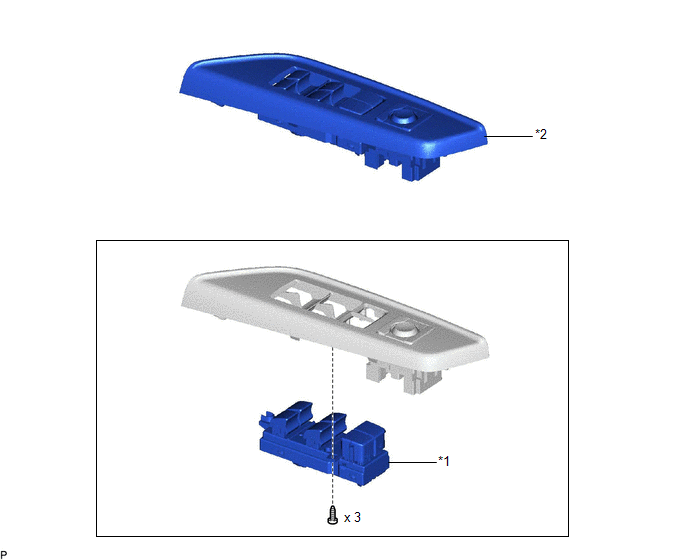
| *1 | MULTIPLEX NETWORK MASTER SWITCH ASSEMBLY | *2 | MULTIPLEX NETWORK MASTER SWITCH ASSEMBLY WITH FRONT DOOR UPPER ARMREST BASE PANEL |
Removal
REMOVAL
PROCEDURE
1. REMOVE MULTIPLEX NETWORK MASTER SWITCH ASSEMBLY WITH FRONT DOOR UPPER ARMREST BASE PANEL
Click here .gif)
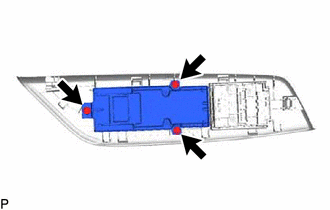
2. REMOVE MULTIPLEX NETWORK MASTER SWITCH ASSEMBLY
| (a) Remove the 3 screws and multiplex network master switch assembly. |
|
Inspection
INSPECTION
PROCEDURE
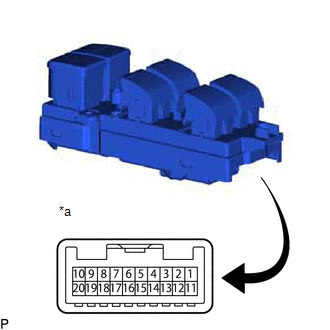
1. INSPECT MULTIPLEX NETWORK MASTER SWITCH ASSEMBLY
| (a) Check that the LEDs illuminate. (1) Apply auxiliary battery voltage to the multiplex network master switch assembly and check that the LEDs illuminate. OK:
If the result is not as specified, replace the multiplex network master switch assembly. |
|
READ NEXT:
 Components
COMPONENTS ILLUSTRATION *A for Driver Side *B for Front Passenger Side *1 COURTESY LIGHT ASSEMBLY *2 FRONT DOOR TRIM BOARD SUB-ASSEMBLY *3 MULTIPLEX NETWORK MASTER SWITCH ASS
Removal
REMOVAL CAUTION / NOTICE / HINT The necessary procedures (adjustment, calibration, initialization, or registration) that must be performed after parts are removed and installed, or replaced during pow
SEE MORE:
Remote Engine Starter does not Operate
WIRING DIAGRAM CAUTION / NOTICE / HINT NOTICE: Before replacing the DCM (telematics transceiver), refer to Registration. Click here PROCEDURE 1. CHECK SMART KEY SYSTEM (for Start Function) (a) Check that the engine can be started by pressing the power switch. Result Proceed to E
Inspection
INSPECTION PROCEDURE 1. INSPECT TURN SIGNAL SWITCH (a) Measure the resistance according to the value(s) in the table below. Standard Resistance: Light Control Switch Tester Connection Condition Specified Condition
*1: w/ Light Control Switch DRL OFF Position
2 (L_OFF) - 12 (EL)
